
Rental Property Maintenance Log Template: The Owner Side System for PM Managed Rentals
If you own rentals long enough, maintenance becomes the quiet tax on your time.
The tenant texts your property manager. The property manager calls a vendor. An invoice shows up somewhere. The next month, a line item hits your owner statement. Three months later, you are trying to remember whether that water heater was repaired or replaced.
That is why a rental property maintenance log template matters. Not as busy work, but as a simple system that keeps your portfolio from leaking money through duplicates, missed follow ups, and untracked repairs.
This guide gives you a copy paste template, plus the owner side workflow that actually keeps it updated when a property manager sits in the middle.
Why maintenance gets messy after 3 properties (even with a property manager)
Most owners do not fail on maintenance because they are careless. They fail because the information is fragmented.
- Requests arrive by text, email, or a phone call.
- Photos live in a text thread.
- Invoices live in email attachments.
- Costs live inside your property management statement.
- Warranty details live in a folder you never open.
The result is predictable:
- You pay for the same fix twice because you cannot see the history.
- Your tax prep turns into a weekend of searching for receipts and guessing categories.
With a property manager, the mess gets worse because the timeline is not in your hands. You only see the maintenance after it happens, and usually as a single line item on a statement.
If you want a portfolio that actually feels passive, you need an owner side log that captures the full story.
The rental property maintenance log template (copy paste)
Use this template in Google Sheets or Excel. The key is not fancy formulas. The key is consistent fields that let you sort, filter, and review patterns.
Copy and paste this table header row:
| Field | What to record | Why it matters |
|---|---|---|
| Property | Property name you use everywhere | Lets you group spend and issues correctly |
| Unit | Unit identifier (if applicable) | Prevents mixing repairs across units |
| Date reported | The day the issue was first reported | Proves response timeline and helps triage |
| Reported by | Tenant, PM, inspection, you | Shows whether you are reactive or proactive |
| Issue summary | One sentence description | Makes the log scannable |
| Category | HVAC, plumbing, electrical, appliance, roof, pest, turn, other | Helps you see repeats and budget by system |
| Priority | Emergency, high, normal, low | Keeps your queue honest |
| Approved budget | The number you approved (if you approve work) | Stops surprise invoices |
| Vendor | Company or technician | Builds your vendor bench over time |
| Work order or invoice ID | Any reference number | Makes documents searchable later |
| Date scheduled | When work is planned | Prevents endless “waiting on vendor” loops |
| Date completed | When work is done | Lets you measure cycle time |
| Total cost | Parts plus labor | Powers tax, budgeting, and trend review |
| Paid by | PM reserve, owner ACH, credit card, escrow, other | Helps reconcile and avoid double pay |
| Receipt or invoice link | File name or URL | Makes tax and disputes easy |
| Notes | Warranty, parts used, follow up, photos | Captures the context you will forget |
| Status | Open, in progress, pending approval, complete | Gives you a live view, not a history lesson |
Optional columns that pay off fast:
- System age (HVAC, water heater, roof)
- Repair vs improvement (your best guess)
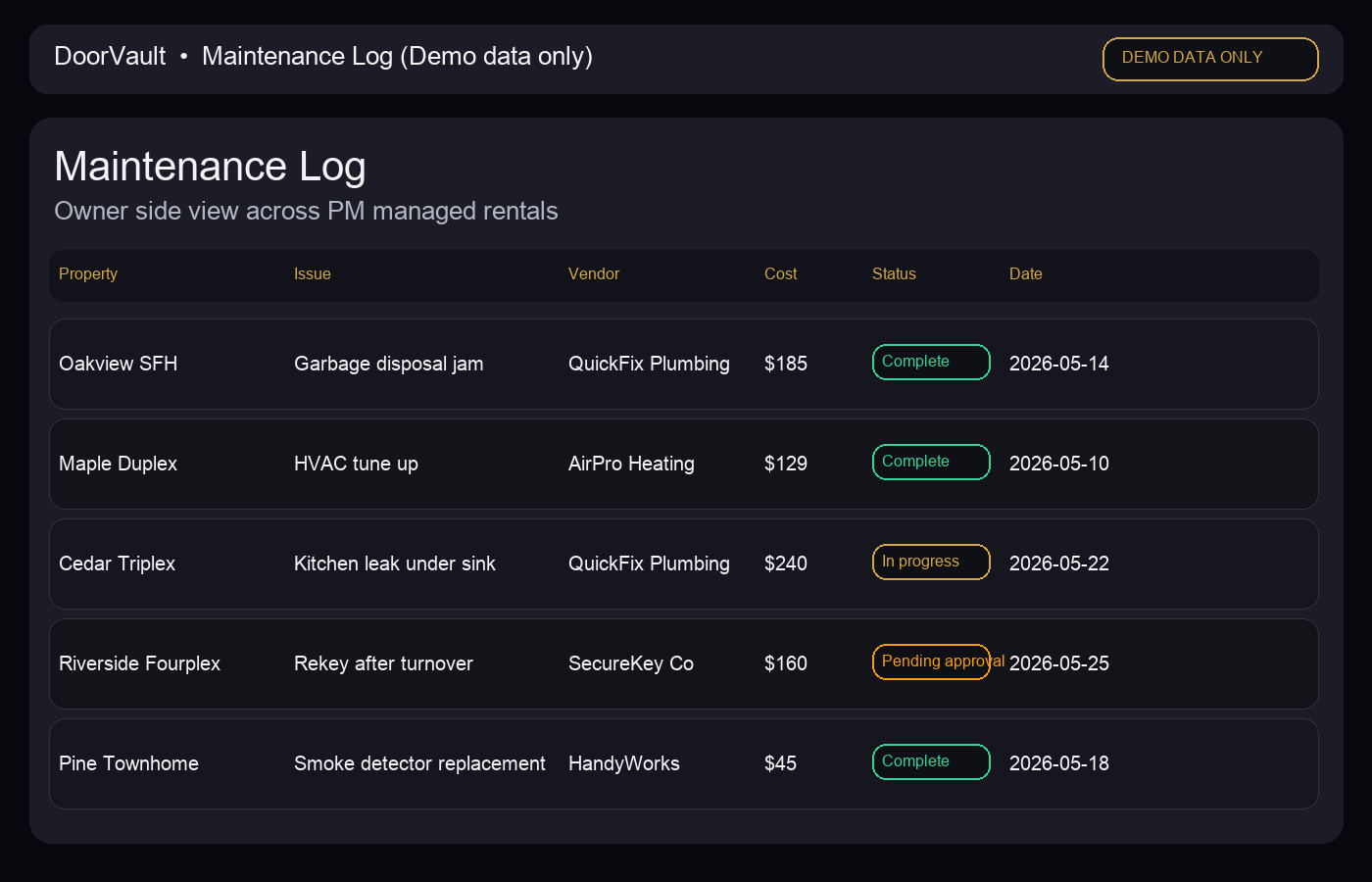
The owner side workflow that keeps your log current with a property manager
Templates fail when the workflow is vague. Here is a simple owner side workflow that works whether you approve every repair or let your PM run under a limit.
Step 1: Capture the request in one place
Do not rely on a text thread as your system.
If you want a low effort option, create a single email label or folder and forward every maintenance related email into it. If you want a real system, you need a place where the request, photos, invoice, and PM statement line item end up together.
This is where DoorVault’s Knox Intelligence is built for owners. Knox Intelligence is AI that proposes, learns, and never touches your data without permission. You forward any property related email, upload a document, or sync a folder. Then Knox reads it, extracts the details, and organizes it by property.
Step 2: Approve, assign, and track the decision
Write down what you approved, not just what you paid.
- Approved budget
- Vendor chosen
- Any constraints (parts only, warranty claim, tenant coordination)
This prevents the classic problem where the invoice arrives and you cannot remember what you agreed to.
Step 3: Attach the documents as you go (not at tax time)
A maintenance log without documents is just a list of memories.
Attach the invoice, before and after photos, and any warranty or inspection report. If your PM sends an invoice in an email, forward it. If you get a paper receipt, snap a photo.
In DoorVault, Knox can read invoices, receipts, inspection reports, and even closing documents. It files them to the right property in your Document Vault and proposes the transaction so your books stay current without manual entry.
Step 4: Close the loop with reconciliation
Maintenance gets expensive when you cannot reconcile the story.
At minimum, your log should let you answer:
- Did the PM charge match the invoice amount
- Did the bank deposit reflect the expected maintenance spend or reserve movement
- Did the issue repeat within 60 to 90 days
If you want a practical walkthrough for the statement side, this pairs well with our guide on owner statement reconciliation: https://blog.doorvault.app/owner-statement-reconciliation-how-to-match-your-pm-statement-to-your-bank-deposit-every-month
How to review maintenance like an operator (not a firefighter)
Once you keep a log, the next level is reviewing it with a few simple questions.
1) What is repeating
Sort by property, then by category. Repeat plumbing calls on the same unit are rarely “bad luck.” They usually point to a root cause or a vendor quality issue.
2) Which vendors are draining your cash flow
Two vendors can both “fix the problem.” Only one does it without a second visit, a vague invoice, and a tenant complaint.
Track average cost by category and whether jobs reopen within 30 days.
3) Is maintenance spend drifting upward quietly
Many owners use a simple rule of thumb like budgeting 1% to 2% of property value per year for maintenance. The rule is not the point. The point is trend.
4) Repair vs capital improvement decisions
This is where owners get hurt at tax time. A new water heater, a roof replacement, or a major HVAC replacement is not the same as a small repair.
DoorVault includes a capital improvement classifier and tax focused exports so you can keep the story clean all year, then hand your CPA clean categories instead of a pile of invoices.
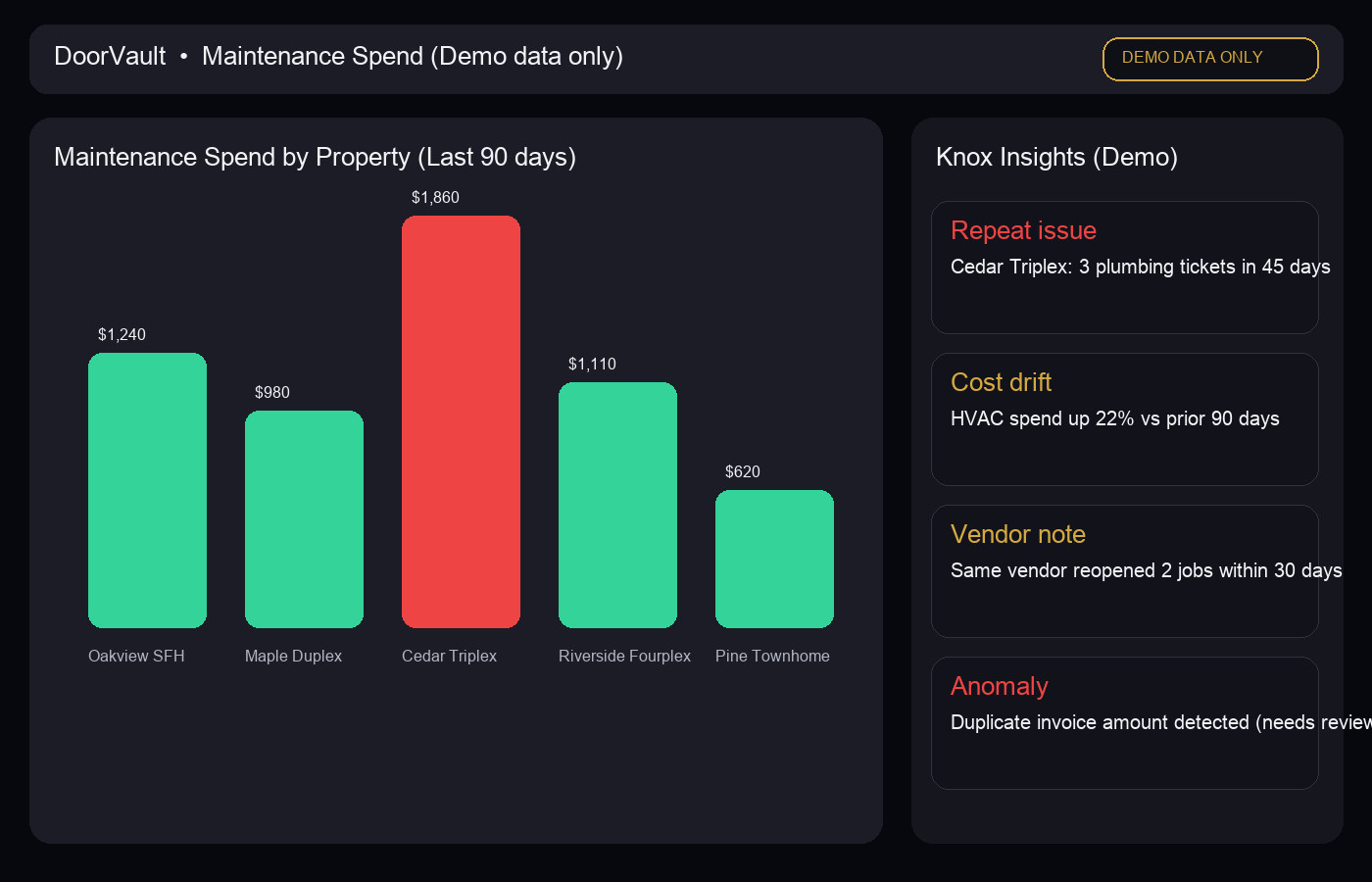
How DoorVault keeps your maintenance log updated automatically
The maintenance log is the visible artifact. The real goal is to stop being the person doing the upkeep of the log.
DoorVault is built for the owner side of rental ownership, especially when you use property managers. The workflow is simple:
- Forward maintenance related emails, PM statements, and invoices to your Knox inbox.
- Upload documents or sync a cloud folder if that is easier for your PM.
- Knox reads the documents, extracts structured data, files everything to the right property, and proposes the transactions for your review.
From there, you get the benefits owners actually want:
- Searchable maintenance history per property with documents attached
- Maintenance spend rollups inside your per property P&L and reports hub
- Anomaly detection that flags unusual expenses and duplicate charges
- Property health scores that surface what needs attention before it becomes expensive
If you want the document system that supports this end to end, start here: https://blog.doorvault.app/best-way-to-organize-rental-property-documents-system
For an overview of the owner side workflow (including statement processing and review), see: https://doorvault.app/property-management-statement-reconciliation/
CTA: start with a template, then let the system do the work
If you are tracking maintenance in texts or a spreadsheet, start by copying the template above and using it for the next 30 days. That alone will reduce duplicates.
If you want the log to update itself, try DoorVault. Start at https://doorvault.app and click Try Demo to see how Knox processes maintenance invoices, owner statements, and documents across your portfolio.