
Rental Property Bookkeeping Software: The Owner Side System for PM Managed Rentals (2026 Guide)
Most rental property bookkeeping software is built around a simple assumption: money hits your bank account and you categorize it.
That assumption breaks the moment you hire a property manager. Your deposit becomes a net number. Repairs and reserves get bundled. Documents live in email attachments. And the PM statement you file away is not the same thing as clean books.
If you own 3 to 20 doors and use a property manager, this guide is the owner side system that keeps your bookkeeping accurate without turning into a second job.
Why bookkeeping gets harder after you hire a property manager
Hiring a PM usually fixes the tenant side of the business. It does not fix the owner side.
Here is what changes operationally:
- You stop seeing rent payments and vendor payments as separate transactions. You see one disbursement.
- Your PM statement becomes the real source of truth for income and expenses, but it is still a PDF.
- Reserves, catch up repairs, and owner draws distort the number that hits your bank.
- Important documents keep arriving: insurance renewals, tax bills, lease renewals, inspection reports, closing docs. None of that lives in your PM portal forever.
This is why people say things like “spreadsheets worked until property five.” Not because the math is hard. Because the workflow turns into constant manual cleanup.
Clean books for PM managed rentals require a system that starts with the statement, not the bank feed.
The non negotiables in rental property bookkeeping software (for PM managed rentals)
When you are evaluating tools, ignore feature lists and ask one question:
Can this software build accurate books when the PM is the middle layer between the property and my bank account?
To do that, the tool needs a few specific capabilities:
- Statement first ingestion. It should treat PM statements as structured data, not a file you store.
- Document handling. Invoices, insurance policies, tax bills, and closing docs need to be filed by property and searchable in seconds.
- A reconciliation loop. You need a repeatable way to tie the PM statement to the bank deposit and catch mismatches.
- Auditability. You should be able to answer: what changed, when, and why, with a one click revert if something is wrong.
- Tax readiness by default. Schedule E mapping should be a natural output of correct books, not an April scramble.
Most tools do a decent job on bank feeds. The failure happens when you ask them to explain what is inside the net disbursement.
The owner side bookkeeping loop (statement, bank, documents)
If you only take one thing from this post, take this:
For PM managed rentals, correct bookkeeping is a three way match.
- PM statement: the line items that explain income, fees, repairs, and reserve movements
- Bank activity: the actual owner disbursement deposits and any owner paid expenses outside the PM
- Documents: the receipts and PDFs that prove what happened (invoices, insurance renewals, tax bills, leases)
Here is the simplest monthly workflow that stays sane as you scale:
Step 1: Ingest the statement. Do not start with the deposit. Start with the statement line items.
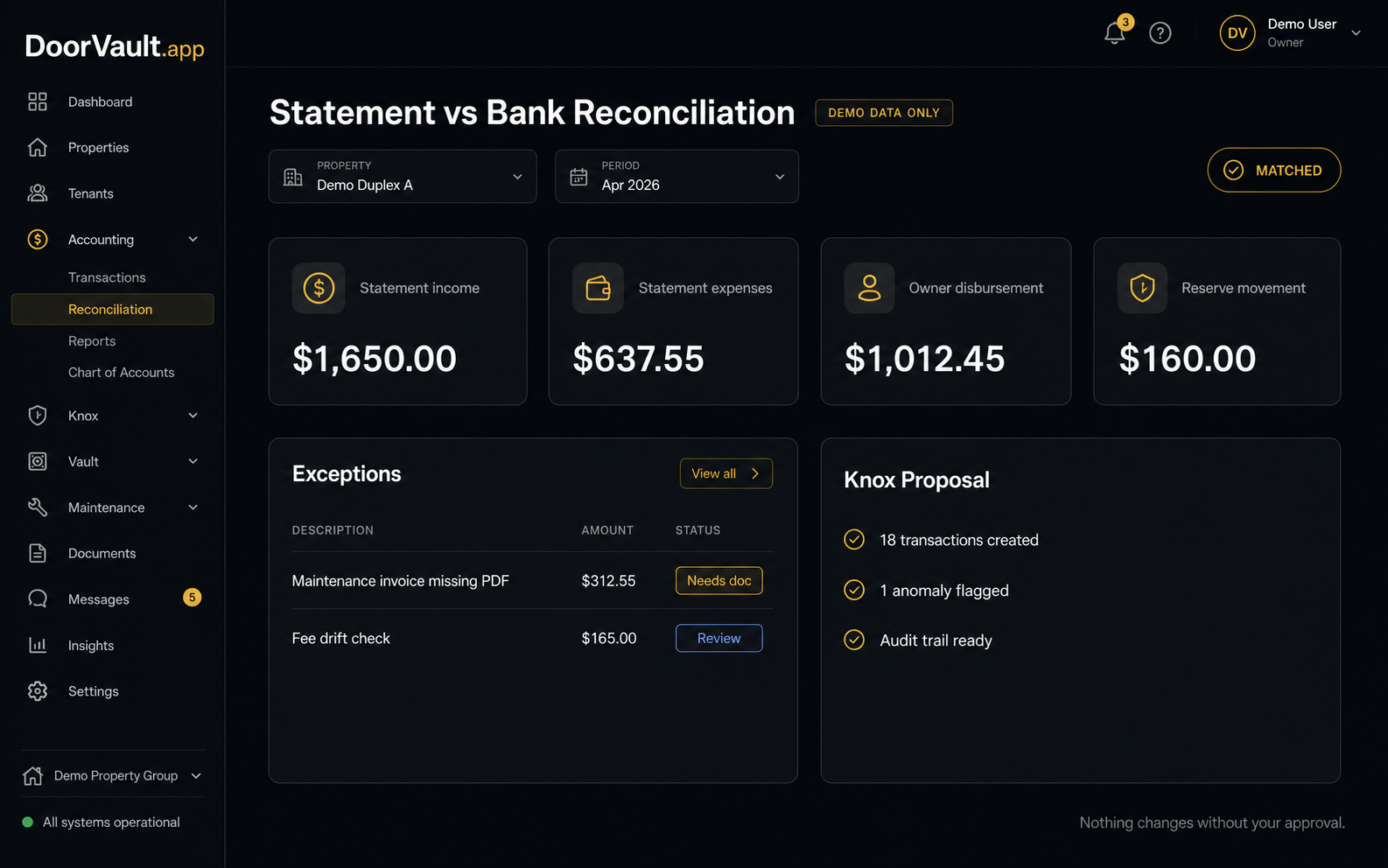
Step 2: Split net deposits into their parts. If the PM deposits $1,012.45, you still need the underlying breakdown: rent, fees, repairs, reserve funding, and credits.
Step 3: Reconcile the totals. The statement total should tie to your bank deposit, either as an exact match or with a clear explanation like reserve balance changes.
Step 4: File the supporting docs. Any repair over your pain threshold should have an invoice attached. Insurance renewals and tax bills should never live only in an inbox.
Step 5: Review exceptions only. Your system should surface the weird stuff: missing months, fee drift, duplicate repairs, rent shortfalls, unexplained credits.
This loop is the difference between “I think my portfolio is fine” and “I know my numbers are correct.”
A real example (with numbers) and why most books end up wrong
Say your PM statement shows:
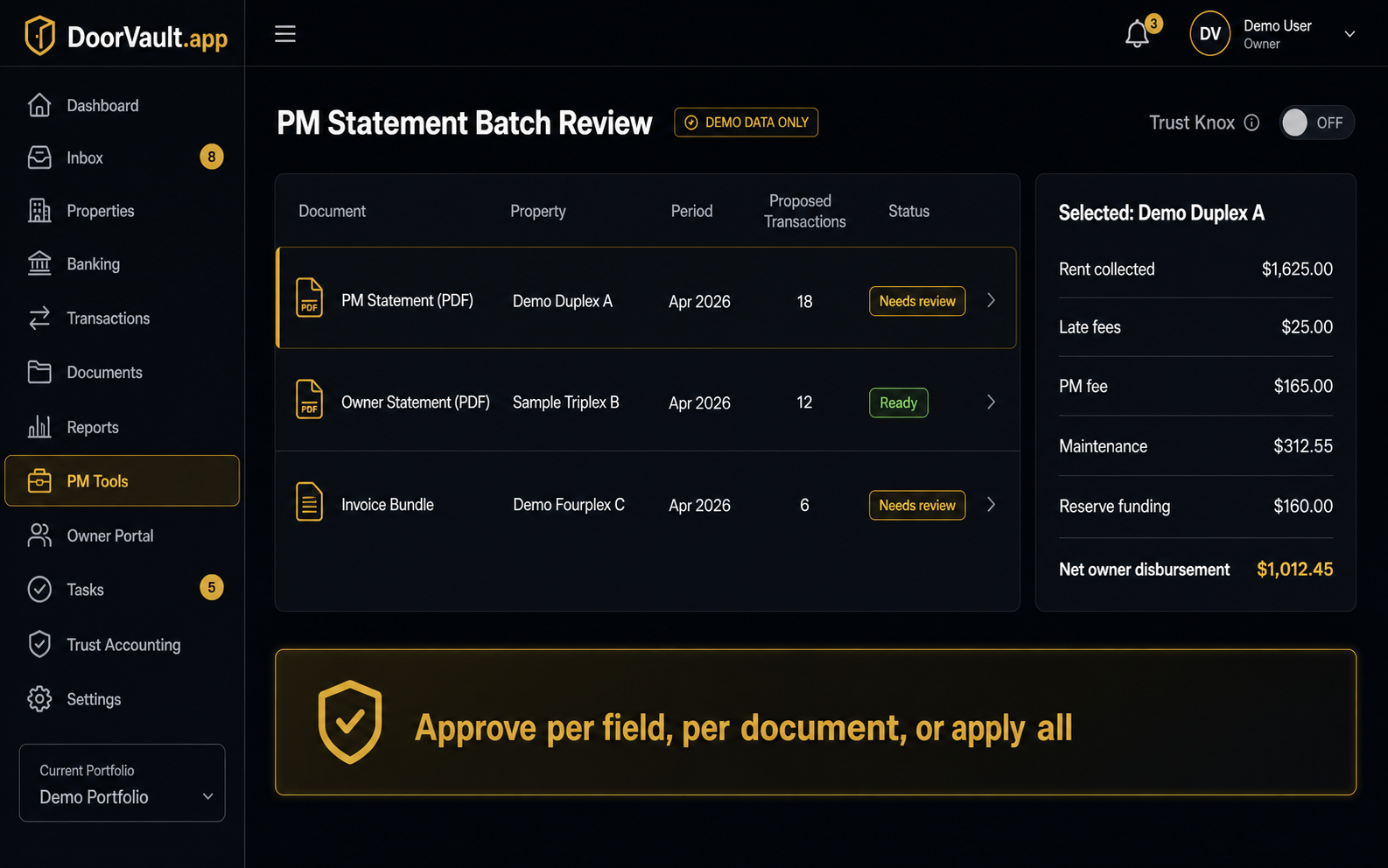
- Rent collected: $1,625.00
- Late fees: $25.00
- PM fee: $165.00
- Maintenance: $312.55
- Owner paid insurance outside PM: $0.00
- Reserve funding: $160.00
- Net owner disbursement: $1,012.45
If you only record the $1,012.45 deposit as “income,” your books are wrong in two directions at once:
- You understate income because rent was higher than the deposit.
- You hide expenses inside the net number, which destroys your per property P and L.
It gets worse when reserves move. Many owners do not realize they are mixing operating performance with reserve movements, then they wonder why cash flow “feels” different than the spreadsheet.
DoorVault was built around this exact owner side reality.
Knox Intelligence is AI that proposes, learns, and never touches your data without permission. In practice, that means you can forward a PM statement email to your Knox inbox, and Knox will read the PDF, extract every line item, create the transactions, and file the document to the right property.
If you want control, you turn Trust Knox off. Knox proposes the changes and waits. If you want speed, you turn it on and review the audit trail after.
When you have a stack of statements, Knox uses a Batch Review page so you can approve a month of bookkeeping in one session instead of clicking through popups.
What DoorVault automates beyond bookkeeping (this is the point)
Correct bookkeeping is the foundation. But owner side operations do not stop there, especially once you are running multiple properties across states or LLCs.
DoorVault is built to run the entire investor side of rental ownership on autopilot:
- Document Intelligence: upload or forward closing disclosures, leases, insurance policies, tax bills, inspection reports, and Knox extracts the fields and files everything automatically.
- PM oversight: Knox reads PM statements, flags missing months, benchmarks maintenance spend, and catches anomalies like duplicate charges and fee drift.
- Portfolio visibility: real time NOI and cash flow, per property P and L, and a portfolio dashboard you do not have to maintain manually.
- Loans and debt tracking: mortgage payment splitting into principal, interest, tax escrow, and insurance escrow, plus portfolio level LTV and debt paydown visibility.
- Tax exports: Schedule E ready exports per property, plus clean transaction categorization you can hand to a CPA without rework.
- Multi entity reporting: consolidated reporting across LLCs so you stop mixing books in one spreadsheet.
If you want a deeper operator view on scaling systems, read The Scaling Wall: Why Most Investors Plateau at 5 Properties. If you want to tighten up your monthly numbers, How to Calculate NOI for Each Property pairs well with the workflow above. And if you are trying to reduce surprise repairs, start with Rental Property Maintenance Checklist: 8 Health Signals.
Buying checklist: how to choose the right tool in 10 minutes
Before you switch software, answer these questions:
- Do you want a bank feed driven system, or a statement driven system built for PM managed rentals?
- Can you tie every PM disbursement to a statement breakdown and a paper trail in under five minutes?
- If you correct a categorization once, will it stay corrected next month, or will you fight the same error forever?
- Can your CPA get what they need without you exporting five CSVs and explaining your spreadsheet?
- If you add five more doors, will the workflow still work, or does it just create more manual review?
If you are reading this and thinking “I do not want another tool, I want the work gone,” that is the category DoorVault was built for.
Try DoorVault for free for up to 2 properties and see how hands off owner side bookkeeping can actually be. Start at DoorVault.app and click Try Demo.