
Owner Statement Reconciliation: How to Match Your PM Statement to Your Bank Deposit Every Month
You get the email. “Owner Statement Attached.”
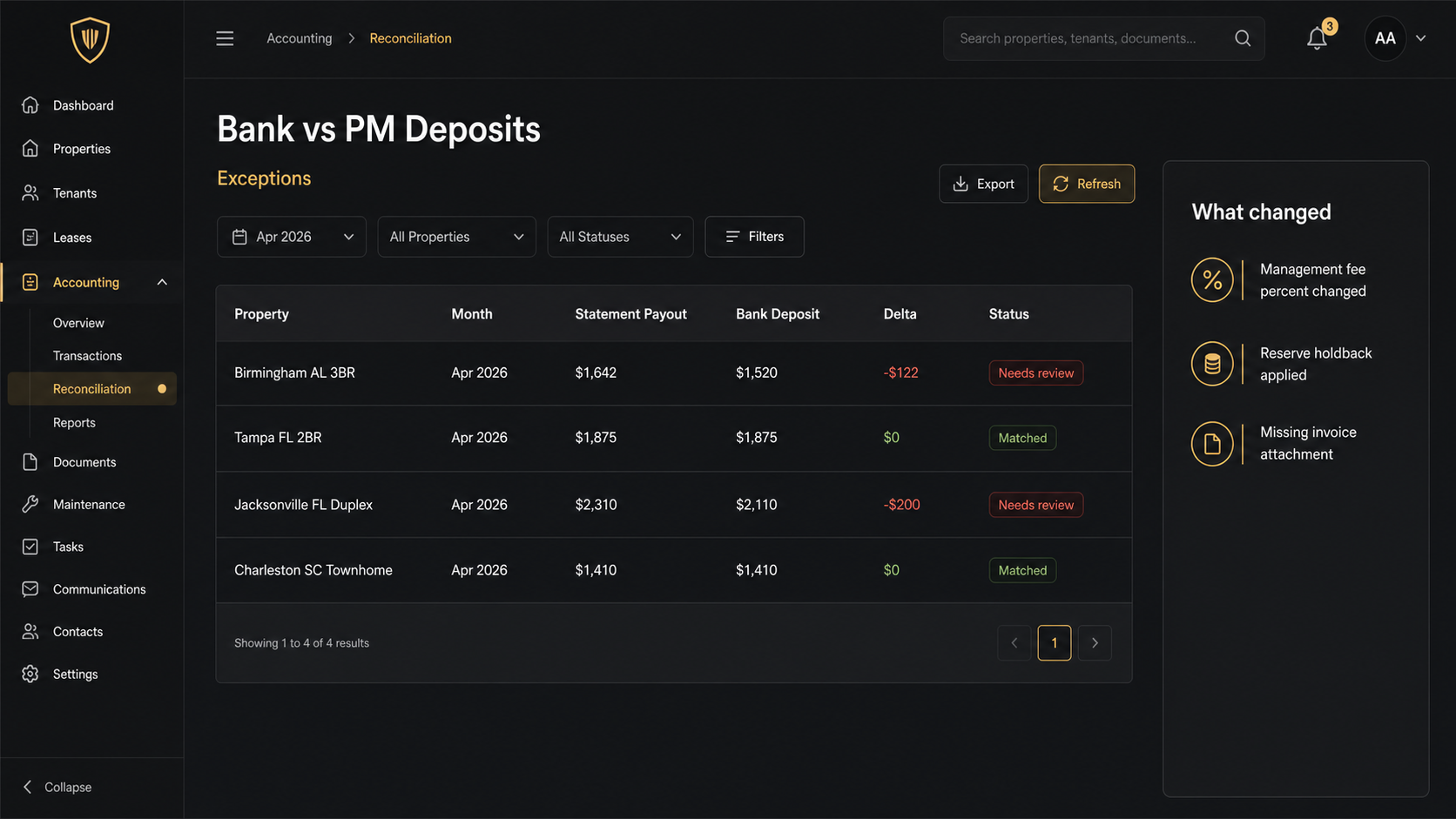
Your property manager says rent collected was $2,000. Your bank shows a $1,642 deposit.
Now you are doing owner statement reconciliation, whether you like it or not.
The problem is not that your PM is trying to hide anything. The problem is that the truth is spread across three places: a statement PDF, your bank activity, and a pile of invoices and renewals buried in email attachments.
This guide gives you a simple monthly workflow that catches the expensive stuff fast, without turning your “passive” rentals into a second job.
What “owner statement reconciliation” actually means when you have a PM
If you manage your own rentals, reconciliation is mostly a bookkeeping task.
When you use a PM, reconciliation is an owner oversight task.
You are verifying three things:
- The statement math is correct.
- The cash that hit your bank matches what the statement says you should have received.
- The documents that justify the expenses actually exist, and belong to the right property.
If you only do one of those, you can still miss the biggest leaks.
Common example: a vendor charge shows up on your statement, but the receipt never makes it to you. Or the PM fee quietly drifts from 10 percent to 12 percent because “the new contract kicked in.” Or a rent payment hits the statement but never hits your bank because it got held in reserves.
The three way match: PM statement, bank deposit, and documents
The fastest way to reconcile is to stop thinking “line by line forever” and start thinking “three way match.”
You need three inputs every month:
- PM owner statement PDF for the property (or a consolidated statement if your PM bundles it).
- Bank activity for the same period (checking account, and credit card if you run owner paid expenses there).
- Supporting documents that explain the non obvious lines (repair invoices, insurance renewals, tax bills, lease changes).
Then you are matching at two levels.
First, the totals level.
- Does beginning cash plus receipts minus disbursements equal ending cash?
- Does “owner paid” actually mean you paid it?
- Are reserves increasing or being drawn down in a way you recognize?
Second, the decision level.
- Are there any new vendors?
- Are there any new fee categories?
- Are there any charges that should have been capital improvements instead of repairs?
If you have more than a couple doors, this is where spreadsheets break. You can do the math, but you cannot keep the document trail clean across months, properties, and entities.
The 10 minute monthly workflow (step by step)
Set a calendar reminder for the same day every month. The goal is to make this boring.
Step 1: Start with deposits, not expenses
Look at the deposit that hit your bank.
Ask one question: does this deposit match the net owner payment on the statement for that month?
If it matches, you just cleared the largest risk in seconds.
If it does not match, you do not need to read every line item yet. You need to understand the delta.
Step 2: Reconcile fee math on one line
Pick one property. Take gross rent collected on the statement.
Multiply by your contracted management fee percent.
If the statement fee is off by even $20, that is a signal. Either the contract changed, the percent is wrong, or the PM is applying fees to other income categories you did not expect.
Step 3: Confirm reserves and holdbacks are not hiding cash
Many PM statements include owner reserves, repair reserves, or security deposit holds.
If the statement says cash was retained, you should see it reflected as an ending balance increase, not just “missing money.”
This is where owners get confused: the rent can be real, but the payout is lower because cash stayed in the PM account.
Step 4: Spot check the top 3 expense categories by dollars
You are not trying to verify every $9 supply run.
You are trying to catch the big stuff.
Look for:
- Repairs and maintenance
- Turnover and make ready
- PM fees and admin fees
If one category spiked, your job is to locate the supporting document fast. If the invoice is not attached or cannot be found, that is the follow up.
Step 5: Make one decision and write it down
Every reconciliation should end with one of three outcomes.
- Clean, file it.
- One question for the PM.
- One correction to your books.
If you do not document the outcome, you will repeat the same work next month.
The 6 discrepancy patterns that cost landlords real money
Most reconciliation problems are not random. They repeat.
Here are the patterns that show up again and again for PM managed rentals.
- Net deposit does not match the statement payout because a prior month adjustment got rolled in.
- Fee drift where the management percent or fixed fee changes without a clear trigger.
- Maintenance charges without receipts where the only “proof” is a line item.
- Duplicate charges (especially recurring subscriptions, inspections, and admin fees).
- Escrow confusion when mortgage escrows exist, but the PM also pays taxes or insurance, so the same cost gets counted twice.
- Capital improvement misclassification that makes year end reporting messy and can create tax headaches.
If you only take one thing from this post, take this.
Your reconciliation process is a money leak detector. It is not a tax season chore.
If you want a deeper monthly statement review, start with the PM statement audit checklist and use this reconciliation workflow to make sure the cash movements match what the statement claims.
How DoorVault turns reconciliation into review, not data entry
Most software assumes you will do the work of entering clean data, then it will show you a report.
DoorVault flips that.
Knox Intelligence is built for the owner side reality: your portfolio produces documents and statements, not tidy transaction exports.
Here is what the workflow looks like in practice.
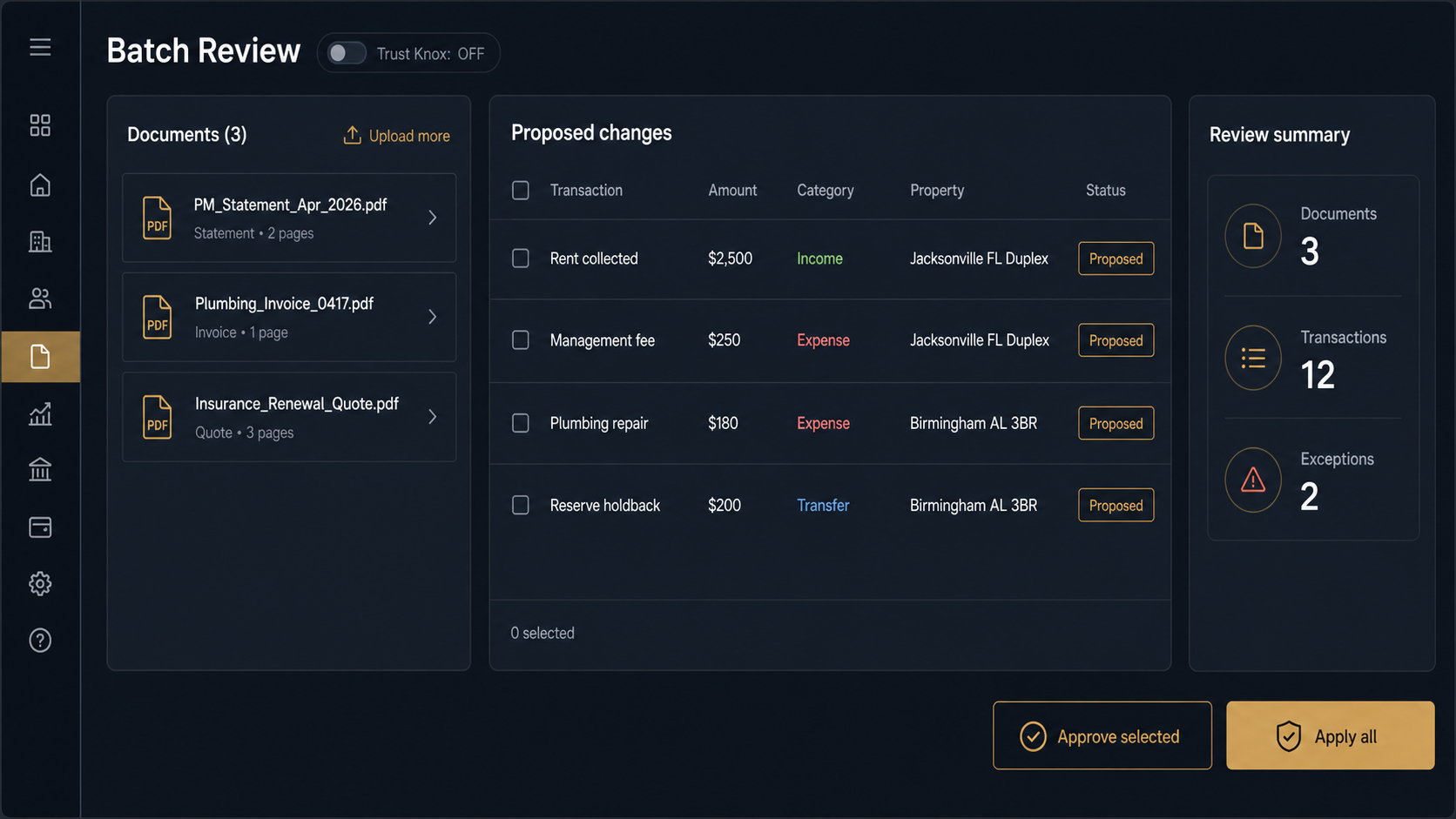
- Forward the PM email to your Knox inbox, or upload the PDF. Knox reads the statement, extracts every line item, and proposes the transactions.
- Connect your bank via Plaid Smart Sync, or upload a bank CSV. Knox matches deposits and withdrawals and flags exceptions.
- If a repair invoice or insurance renewal shows up, Knox files it to the right property, extracts the key fields, and links it to the transaction.
If you want speed, you keep Trust Knox on and let Knox apply what it is confident about.
If you want control, you turn Trust Knox off and review every proposed change in one Batch Review page. No pop ups. No surprise edits.
And when you correct something once, the Learning Loop remembers it for your account so the next statement is cleaner.
Reconciliation then becomes what it should be.
A quick review of exceptions.
Not a monthly data entry project.
This is also where DoorVault’s breadth matters. Once your books are clean, you can actually use the platform.
- Portfolio dashboard for real time NOI and cash flow
- Per property P and L, with consistent categories
- Loans dashboard and mortgage payment splitting
- Equity tracking and refinance scenarios
- Schedule E export and a CPA portal for clean handoffs
- Anomaly detection that flags weird spikes before you notice them
- Document vault and expiration tracking so renewals do not sneak up on you
Related reads if you are building the full owner side system:
- Rental property bookkeeping software for PM managed rentals
- Rental property expense tracking without manual entry
Monthly reconciliation checklist you can reuse
Monthly reconciliation checklist you can reuse
If you want a simple version, use this every month.
- Compare statement payout to bank deposit.
- Verify management fee math.
- Review reserves movement.
- Validate top expenses with receipts.
- Flag duplicates and odd spikes.
- Record one outcome: clean, question, or correction.
Try DoorVault free for up to 2 properties and see what owner statement reconciliation looks like when you are reviewing exceptions instead of doing manual bookkeeping. Start at DoorVault.app and click Try Demo.