
Property Management Reserve Fund: How Much to Keep and How to Track It (Owner System)
If you use a property manager, you probably have an “owner reserve” sitting in their account.
And if you are being honest, you probably do not have a clean way to answer two simple questions:
- What is my reserve balance for each property today?
- What exactly did the reserve pay for this month, with the invoice attached?
The reserve fund problem is visibility.
This guide shows you what a property management reserve fund is, how to pick a reasonable amount, and the owner side tracking system that keeps reserves from turning into a monthly argument about repairs.
The reserve fund problem owners actually have
Most owners do not mind keeping a reserve. They mind surprises.
The surprise pattern looks like this:
- Your PM requires a 500 dollar reserve at onboarding.
- A few small repairs get paid “out of reserves.”
- Your monthly owner statement shows “reserve contribution” and “maintenance” lines, but no invoices.
- Three months later you realize your rental has not cash flowed in a year.
The reserve did not break your deal. The missing paper trail did.
Your goal as the owner is simple:
Keep reserves so the PM can move fast on small repairs, but keep the documentation and approval rules tight so you can audit the money without turning your rentals into a second job.
What a property management reserve fund is (and what it is not)
A property management reserve fund is owner money held by the property manager to cover expenses that cannot wait for the next rent cycle.
It is commonly used for:
- Small repairs under your approval threshold
- Turnover costs (lock changes, cleaning, minor make ready)
- Urgent work that prevents bigger damage (active leak, no heat, broken exterior lock)
It is not the same thing as:
- The tenant security deposit (that is tenant money, not yours)
- A long term capital reserve plan (roof, HVAC replacement, major rehab)
Owners get into trouble when all of that gets blended into one vague bucket called “reserve.” You want clear definitions in your system and in your PM agreement.
How much to keep in your reserve fund (simple ranges that work)
You will see three common reserve styles:
- A fixed minimum per property (often 300 to 1,000 dollars)
- One month of rent
- A moving target that climbs every time the PM gets nervous
For most single family rentals with a PM, a fixed minimum is the cleanest because it is easy to track and easy to audit. Here is a practical way to pick your number:
Step 1: Choose your “no questions asked” repair limit.
Example: You are fine with your PM approving any repair up to 250 dollars without calling you.
Step 2: Set the reserve so it can cover two of those repairs without going negative.
That is 500 dollars.
Step 3: Add a buffer if you have an older property or long vendor lead times.
That might push you to 750 or 1,000.
Now your reserve amount is tied to a decision rule, not a feeling. One warning: do not let the reserve quietly become a cash flow mask.
If your PM is regularly pulling rent into the reserve to keep it at the minimum, that is a signal. Either the property has a real maintenance problem, your approval threshold is too high, or the documentation is too weak and you are losing track of what is happening.
The owner side tracking system (reserve ledger, documents, and approval rules)
If you want reserves to stay boring, you need a simple ledger and a strict document rule.
1) Track reserves as a balance with events, not as a vague line item
Your reserve needs a beginning balance, plus two types of events:
- Adds (owner contribution, rent withheld to replenish)
- Draws (repair paid, utility paid, turnover cost)
If you cannot see those events, you cannot audit anything.
If you need a simple start, track a monthly beginning balance, adds, draws, and ending balance per property. Then for every draw, keep this table:
| Field | What to record |
|---|---|
| Date | When the expense hit |
| Property | Which property |
| Vendor | Who was paid |
| Reason | One sentence |
| Amount | Dollar amount |
| Approval | Under threshold or approved by owner |
| Document link | Invoice, quote, or work order |
This table is the difference between “I think this is right” and “I can verify this in 30 seconds.”
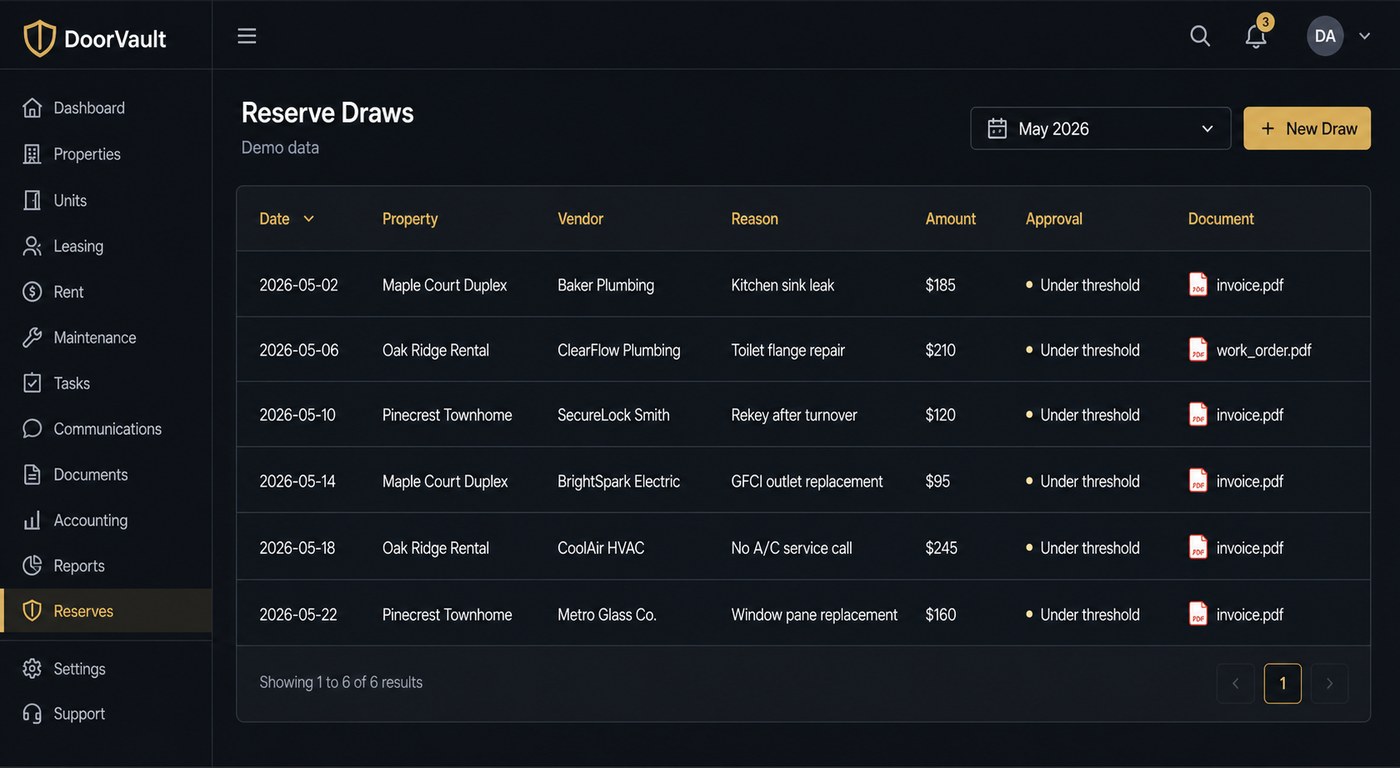
2) Require a document for every draw, even under the approval threshold
Owners waste time fighting about the threshold. The threshold is not the problem. The missing invoice is. Make this your rule:
If the PM charges you for it, you should have an invoice, quote, or work order attached to the month it happened.
Not at year end. Not “available upon request.” Attached by default.
If you want a broader owner side monthly workflow that pairs with this, this guide is the natural companion: https://blog.doorvault.app/owner-statement-reconciliation-how-to-match-your-pm-statement-to-your-bank-deposit-every-month
3) Separate “reserve draw” from “maintenance markup”
Reserve draws are expenses.
Maintenance markups and coordination fees are fees.
If they get blended, you cannot tell whether the property is getting more expensive to operate or the PM is getting more expensive to work with.
If you want a clean breakdown of the markup side, start here: https://blog.doorvault.app/property-manager-maintenance-fees-markups
The monthly reserve review routine (10 minutes, real visibility)
This is the routine that keeps reserves from becoming invisible.
Step 1: Confirm the ending reserve balance on the owner statement
You should see:
- Beginning reserve
- Additions
- Draws
- Ending reserve
If you only see a “reserve contribution” line, ask for the reserve ledger view.
Step 2: Spot the three red flag patterns
1) The reserve minimum keeps increasing with no written change
2) Repairs are happening, but invoices are not showing up
3) Your cash flow is flat, but maintenance is constantly “urgent”
When those patterns show up, do not argue about one invoice. Tighten the system.
Step 3: Run a three way match
You are matching:
- The PM statement
- Your bank deposits
- The documents that justify the expenses
If you only do one of those, you can still miss the biggest leaks.
This is also where document organization matters. If your invoices and statements live in random email threads, you are never going to be consistent. This system covers the document side end to end: https://blog.doorvault.app/best-way-to-organize-rental-property-documents-system
How DoorVault keeps reserve tracking from turning into a spreadsheet job
Spreadsheets fail because you are the integration layer. You are the one copying numbers from statements, hunting down invoices, matching bank deposits, and trying to remember what happened last month.
DoorVault flips the workflow.
Knox Intelligence is AI that proposes, learns, and never touches your data without permission. You forward any property related email, upload a document, or sync a folder. Knox reads it, extracts the fields that matter, files it to the right property, and proposes the transactions for review.
For reserves, that means the system can actually stay current without you rebuilding it every month:
- Forward the owner statement PDF and related invoices. Knox reads the line items, organizes the documents by property, and proposes the reserve draws and maintenance transactions.
- Connect your bank and reconcile the deposits against the owner statement. You see mismatches quickly instead of discovering them months later.
- Review exceptions, not everything. If you keep Trust Knox OFF, you approve proposed changes in a single Batch Review screen. If you correct something once, Knox learns how you want it handled for your account.
The key is that reserves do not live in a silo. Once your data is clean, the rest of the platform becomes useful:
- Portfolio dashboard and per property reports (NOI and cash flow visibility)
- Loans dashboard and equity tracking (debt and performance in one view)
- Anomaly detection (spikes, duplicates, missing rent patterns)
- CPA portal and Schedule E export (clean year end handoff)
- Document expiration tracking (renewals do not sneak up on you)
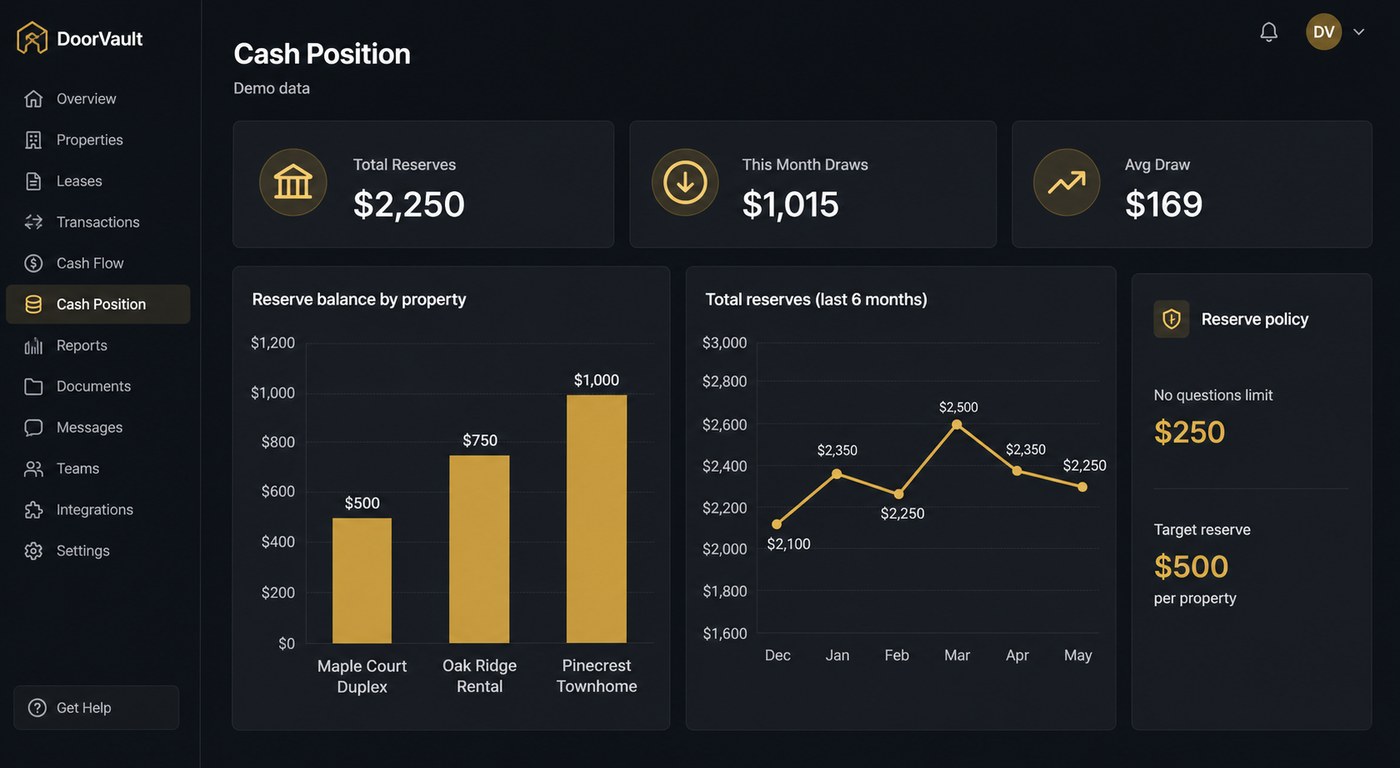
If you want the owner side reserve story to be boring, you need two things: documents attached to every draw and a system that lets you review the exceptions fast.
CTA: keep the reserve, fix the visibility
If your reserve process is currently “trust the statement,” start by adding one rule: every reserve draw needs an invoice attached.
If you want to stop living in spreadsheets and email threads, try DoorVault. Start free with up to 2 properties. No credit card. Go to https://doorvault.app and click Try Demo to see how Knox turns statements, invoices, and bank activity into a clean owner side view.