
Property Manager Repair Approval Threshold: The Owner Proof Checklist
A property manager repair approval threshold sounds like a small contract detail.
It is not.
It is the line that decides when your manager can spend your money without asking you first.
Set it too low and every toilet call becomes an email thread. Set it too high and you may not see the pattern until the statement arrives with $1,045 of maintenance in one month and a very relaxed explanation.
The number matters. The proof matters more.
Your property manager runs the repair process. You still own the asset, the cash flow, and the paperwork that proves what happened.
What the threshold actually controls
Most property management agreements give the manager authority to approve routine repairs under a certain dollar amount. Common examples are $250, $300, $500, or a higher emergency limit.
That authority exists for a good reason.
A leaking pipe cannot wait 3 days because the owner missed an email. A tenant should not sit through a weekend because nobody can approve a $185 fix. Speed protects the property.
But the threshold is not permission to make charges invisible.
It controls approval timing. It should not erase documentation, vendor detail, photos, work order notes, or the line item that later appears on the owner statement.
That is the part owners miss when they negotiate the number and ignore the proof trail.
If your threshold is $500, the manager may be allowed to approve a $275 repair without waiting for you. Fine. You should still be able to see what broke, who fixed it, when it happened, which property it hit, which invoice supports it, and how it affected the net payout.
The leak starts below the limit
Most owners watch the charges above the threshold.
The quieter problem is the stack of charges below it.
One $210 plumbing visit is normal. Three $210 plumbing visits in 60 days is a question. A $475 repair every month is not a coincidence just because each one landed under a $500 limit.
That is how the threshold becomes a leak.
The manager did not technically violate the contract. The owner still lost visibility.
The check is simple. Sort repair charges by property, vendor, category, and month. Then ask 4 questions.
- How many repair charges landed below the approval line this month?
- How many came from the same vendor?
- How many repeat the same issue?
- How many have an invoice, work order, and short explanation attached?
If you cannot answer those in 10 minutes, the issue is not the threshold. The issue is the owner system around it.
For the broader contract view, pair this with the DoorVault guide to the proof items owners should require before signing a PM agreement: https://blog.doorvault.app/property-management-contract-checklist-8-proof-items-before-you-sign
The owner proof checklist
A repair approval rule should create speed and accountability at the same time.
Use this proof checklist for every PM managed rental.
- Contract threshold. Write down the standard limit and the emergency limit, if they differ.
- Work order. Require a date, property, tenant issue, vendor, and close status.
- Invoice. Require an attached vendor invoice for every charged repair, including repairs below the threshold.
- Approval record. For charges above the line, keep the email, portal note, or written approval.
- Photos. Require before and after photos for turnovers, exterior work, safety items, and larger repairs.
- Markup visibility. If the manager charges a coordination fee or markup, it should appear clearly.
- Statement line. The repair should appear in the right month and the right property.
- Bank match. The net owner payout should still match the statement after repairs, reserves, and fees.
This is not about fighting every invoice.
It is about avoiding the most expensive sentence in rental ownership.
“I assumed the manager had it.”
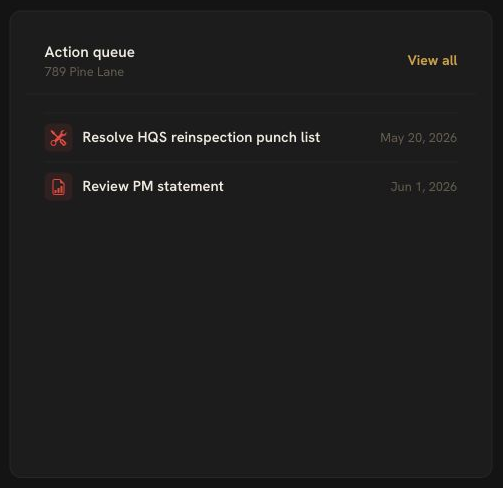
DoorVault keeps owner review work in the Action Center, so a repair question, PM statement review, missing proof item, or manager follow up does not get buried in an inbox.
The statement is where the threshold proves itself
Your repair approval threshold lives in the contract. The damage shows up on the statement.
That is why a monthly PM statement review is non negotiable.
Look for 5 repair signals.
- Maintenance total for the month.
- Repair charges per property.
- Vendor concentration.
- Charges just under the approval limit.
- Missing invoices or vague descriptions.
A property with $1,045 in maintenance is not automatically a problem. It may be a make ready month. It may be a safety repair. It may be the right call.
But it should not be a mystery.

The PM statement is only one piece. The owner deposit has to match too.
If the statement says the net payout is $12,875 after maintenance, fees, and other charges, the bank should support that number. If it does not, the repair threshold question just became a reconciliation question.
That is why performance metrics and repair proof belong together. The PM may be fast. The PM may also be loose. You need numbers that show the difference.
Related guide: https://blog.doorvault.app/property-manager-performance-metrics-owner-report-card
How DoorVault keeps the proof connected
DoorVault is built for investors who use property managers and still need an owner side system of record.
The workflow is practical.
Forward the PM email. Upload the invoice. Sync the owner portal when available. Knox reads the statement, extracts the repair lines, ties them to the right property, and parks anything uncertain for review.
From there, the repair charge does not float alone.
It stays connected to the PM statement, bank deposit, document record, vendor, property, tax category, Action Center item, and PM Report Card.
That matters because repair approval is never only about maintenance. It affects cash flow, reserves, NOI, Schedule E categories, insurance proof, tenant history, manager accountability, and the decision to keep or replace a PM.
DoorVault Connect helps owners bring PM portal data from supported systems into the owner view. PM statement processing turns PDFs into reviewable transactions. Bank reconciliation checks the payout. The PM Report Card shows whether the manager is creating clean months or recurring questions.
The manager can still run the repair.
DoorVault helps the owner prove the asset stayed under control.
What to set in your next PM review
Do not ask only, “What is your repair approval threshold?”
Ask these instead.
- What can you approve without me?
- What requires written approval?
- What documentation do I receive for repairs below the line?
- How do I see repeat vendor charges?
- How do repair invoices tie back to my statement and payout?
The number you choose depends on the property, market, rent level, reserve balance, and trust in the manager. A $300 limit may fit one house. A $750 emergency limit may fit another.
The exact number is not the whole control.
The control is whether you can prove what happened afterward.
Your property manager runs the property. DoorVault runs the asset record behind it.
Free for 30 days. Everything unlocked. No credit card. https://doorvault.app