
Your PM portal is not the system.
It is one login with one version of the month. Property manager portal sync only becomes useful when the statement, bank deposit, reserve movement, invoices, documents, loan records, and portfolio P&L all agree.
Otherwise you synced a PDF.
Congrats. The spreadsheet has a new roommate.
The portal is one witness, not the verdict
Most owner portals do a reasonable job at the job they were built for.
They let you see statements. Download reports. Find documents. Message the property manager. Maybe see reserves, owner distributions, and maintenance notes.
That is useful.
It is not the same as running the asset.
The portal is still your PM system showing PM data in PM language. It usually answers the PM question: what did our system close this month?
You need the owner question:
Did this property produce the cash flow and NOI I think it produced?
Those are different questions.
A portal can show a clean $1,215 owner distribution while the bank shows $1,115. Maybe the $100 is a reserve top up. Maybe it is timing. Maybe a repair got posted after the statement ran. Maybe someone fat fingered the payout.
The portal does not become proof until the money trail agrees.
Five checks before you trust the sync
Property manager portal sync should trigger a short owner check, not a victory lap.
Start with 5 records.
-
Rent collected. Scheduled rent is not collected rent. If the lease says $1,500 and the statement shows $1,250, the month needs an explanation before it hits your performance view.
-
Management fee basis. A 10 percent fee on collected rent is different from a 10 percent fee on scheduled rent. Same number. Different math. Very cute.
-
Maintenance support. A $375 repair should tie to an invoice, work order, photo, or vendor note. A one line charge named “maintenance” is not evidence. It is a shrug with an amount.
-
Reserve movement. Owners love finding reserve changes three months later. Nobody has ever said, “I hope my cash flow report hides one more reserve top up.”
-
Bank payout. The net distribution should match what landed in the bank, or the difference should have a documented reason.
That is the owner close.
Statement. Documents. Deposit. Property P&L. Same month. Same story.
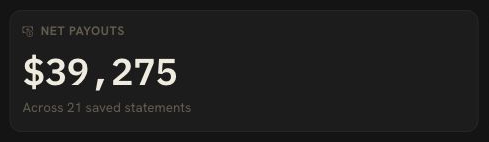
For the deeper statement packet, use the property manager statement reconciliation guide. If you want the faster monthly smoke test, the property manager statement checklist covers the pieces worth checking first.
Multi PM owners outgrow portal hopping fast
One portal is annoying.
Three portals is a hobby.
Different managers use different owner statement formats. Different payout dates. Different reserve policies. Different document habits. One calls a charge maintenance. Another calls it repairs. Another buries it under owner expenses and walks away whistling.
That does not make any PM bad.
It makes the owner the integration layer.
The problem gets worse right when the portfolio starts working. Door 2 adds a second monthly statement. Door 4 adds another bank account. Door 6 adds another entity. Door 8 adds a loan, insurance renewal, vendor invoice, and tax question that all want to live in the same record.
The portal cannot unify that.
It can only show what one PM has.
That is why the owner side needs its own system of record. Not another place to stare at reports. A place where PM data, bank activity, documents, loans, tax records, and portfolio decisions agree.
DoorVault turns portal data into proof
DoorVault is built for investors who use property managers.
The property manager runs the property. DoorVault runs the asset side.
With DoorVault Connect, the owner picks a sync window from inside DoorVault, then uses their own active PM portal session to pull supported portal data into the owner account. The owner asks for the import. Nothing sits there polling the portal in between.
Portal sessions die, usually overnight, usually the night before you needed the number. Save your portal sign in details and the connection signs itself back in and keeps syncing. Encrypted, optional, and you can change or remove them any time. Skip it and DoorVault asks you to reconnect by hand instead.
One less weekly chore that was never really your job.
Then Knox does the boring work.
Knox reads the owner statements, extracts rent, fees, repairs, reserves, and net payouts, files the documents to the right property, and checks the expected payout against the bank deposit.
If the statement says $1,215 and the bank shows $1,215, good. Move on.
If the bank shows $1,115, DoorVault keeps that as a question with evidence attached.
That is the difference.
Most tools store the statement. DoorVault makes the statement defend itself.
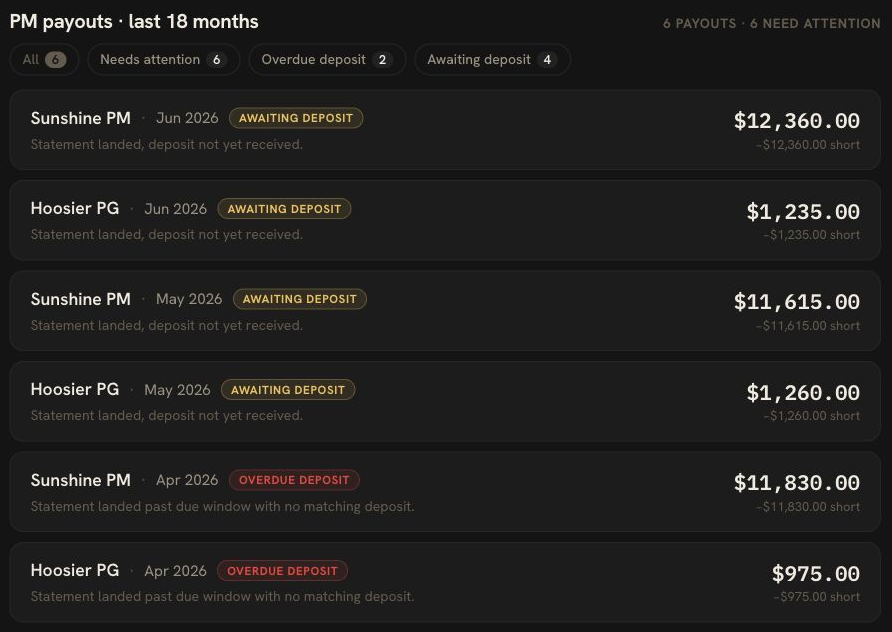
This is also why the product cannot stop at portal sync. The same owner record has to carry the repair invoice, lease, insurance renewal, mortgage split, entity, Schedule E category, loan balance, and portfolio P&L.
Not a feature tour.
The month, tied together.
The DoorVault Connect page explains the sync path. The owner statement reconciliation article shows the full monthly close.
The best month is boring
The best owner portal sync ends with nothing dramatic.
Statement arrived. Rent matched. PM fee matched. Repair had an invoice. Reserve movement made sense. Bank deposit landed. P&L updated. Documents filed. No mystery line survived the month.
Yeah. That is it.
The win is not logging into one more portal.
The win is knowing the asset record is clean enough to make a decision from.
Buy the next property. Ask the PM about a repair pattern. Send the CPA clean numbers. Hold because the NOI is real. Sell because the cash flow is not.
Those decisions need proof.
The portal is where the data starts.
The owner side system is where the month gets trusted.
Free for 30 days. Every feature. No card. Then your first 2 doors stay free forever.
Start at https://doorvault.app
FAQ
What is property manager portal sync?
Property manager portal sync is the process of pulling owner visible records from a PM owner portal into another system. The useful records usually include owner statements, distributions, property data, tenant or lease details, maintenance notes, and documents.
Why is an owner portal not enough for investors?
An owner portal shows what one property manager has published. Investors still need to verify the statement against bank deposits, invoices, reserves, loans, tax categories, entity records, and portfolio performance. That owner side proof usually lives outside the PM portal.
What should I check after syncing a PM portal?
Check 5 things first: rent collected, management fee basis, maintenance support, reserve movement, and net payout to the bank. If those agree, most of the month is trustworthy. If one fails, the statement needs review before you trust NOI.
How does DoorVault handle PM portal sync?
DoorVault Connect lets an investor pull supported owner portal data into DoorVault on demand. Knox reads the statements and documents, ties them to the right property, checks payouts against bank deposits, and surfaces exceptions for review.
Does DoorVault replace my property manager?
No. Your property manager still runs leasing, rent collection, repairs, and tenant operations. DoorVault runs the owner side: statements, documents, money movement, loans, tax records, portfolio performance, and the questions you need to ask before trusting the month.