
An owner contribution on a property manager statement is not rent.
It is not NOI. It is not income. It is not a cute little accounting footnote you can ignore because the payout already hit your bank.
It is you putting money back into the property.
Sometimes that is fine. A $500 reserve top up can be normal after a repair month. A $1,200 owner contribution can be the clean way to cover a negative balance before the next rent cycle.
But if the line has no trail, it is not a contribution yet.
It is a question wearing a dollar sign.
The Contribution Line Needs a Reason
Property managers use owner contributions when the property needs money from the owner. That may mean funding the reserve, covering a repair, clearing a negative balance, supporting a make ready, or holding cash before a larger bill hits.
None of that is automatically wrong.
The problem is when the statement says Owner contribution $500 and the owner treats it like the month is closed.
Closed based on what?
You need the reason, the approval, the document, the bank movement, and the property record. Otherwise the same line can mean five different things.
If it funded reserves, the reserve balance should move.
If it covered a repair, the invoice should exist.
If it cleared a negative balance, the prior month should explain the gap.
If it was owner funded capex, your tax record should not treat it like operating income.
“Owner contribution” is not the answer. It is the label.
Rent and Owner Money Cannot Share a Bucket
Rent is money the property earned.
Owner contribution is capital the owner put in.
Mix those two and the property starts lying to you.
A property can collect $1,650 in rent, spend $900 on repairs, hold $300 in reserves, and still need a $500 owner contribution. If your tracker reads the $500 as income, the month looks stronger than it was. If your tax prep treats it like rental income, your CPA gets a mess with a smile on it.
Very professional. Very wrong.
This is why the owner side system matters. The PM has a trust accounting job. You have an asset management job.
DoorVault keeps those lanes separate. Knox reads the PM statement, extracts the contribution line, ties it to the property, and keeps it out of rental income. If the line needs review, it waits there instead of quietly becoming the month.

That review screen is boring on purpose. Boring is where the money stops escaping.
The 5 Minute Audit Is Enough
You do not need to become your PM’s bookkeeper.
You need a 5 minute contribution audit.
Start with one question: why did I put money in?
Then check four records.
First, the PM statement. The contribution line should name the property, period, and reason. Not a mystery line. Not a vague adjustment.
Second, the bank record. If you sent $500 to the PM, the money leaving your account should match the contribution amount or explain the difference.
Third, the supporting document. For repairs, that means an invoice. For reserve funding, that means the reserve rule or balance change. For a negative balance, that means the prior statement that created the hole.
Fourth, the owner record. DoorVault should know this was owner money, not rent, not PM income, and not an expense paid by a tenant.
That is the whole audit.
Reason. Bank. Document. Owner record.
Anything else is a scavenger hunt with accounting terminology.
Reserves Are Where Contributions Get Foggy
Reserve funding is the cleanest looking contribution and the easiest one to stop checking.
The statement says the PM holds a $500 reserve. The month had a plumbing repair. The PM asks you to replenish the reserve. Fine.
Now prove it.
The reserve balance should show an opening amount, the repair draw, the owner contribution, and the closing amount. If the property had a $500 reserve, used $375 for plumbing, then received a $375 contribution, the closing reserve should be back to $500.
That math should not require archaeology.
DoorVault watches reserve movement as part of the owner statement and payout trail. When a reserve top up explains a short owner payout or a direct owner contribution, the system keeps the line tied to the statement, the document, and the property record.
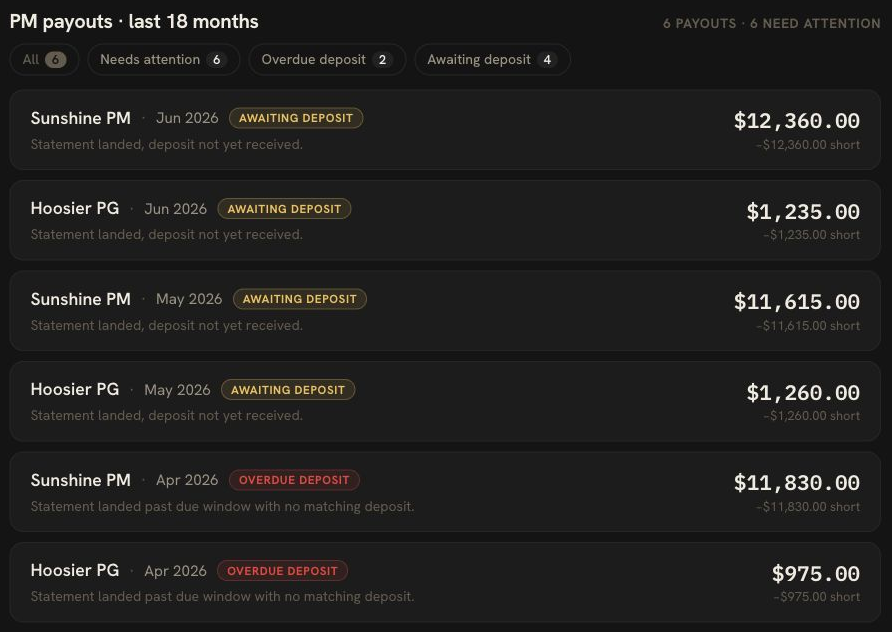
This is also where PM vs Bank reconciliation matters. A statement can show the right reserve math and still leave the payout short. The bank match is the second witness.
One witness is a story.
Two witnesses start to look like books.
DoorVault Treats Owner Funding Like Evidence
The old workflow is predictable.
Download the statement. Stare at the contribution line. Search email for an invoice. Open the bank account. Check last month’s statement. Text the PM. Forget where you saved the answer. Repeat next month.
“I’ll clean it up at tax time.”
Sure you will.
DoorVault was built so the owner does not become the integration layer. Forward the PM statement, upload the file, or sync the folder where it lands. Knox reads the statement, separates rent from owner funding, files the document, and creates the review trail. Bank reconciliation ties expected payouts to actual deposits. DoorVault Connect can also pull supported PM portal records into the same owner account when the PM data lives behind a portal.
The broader point is not one line item. It is the owner side source of truth.
Statements, reserves, invoices, bank deposits, loans, insurance, tax records, and portfolio performance should agree in one place. Otherwise you are not managing the asset. You are managing screenshots.
Beautiful hobby. Terrible operating model.
Do Not Close the Month Until the Line Has a Trail
An owner contribution is not bad news by itself.
Bad news is a contribution with no reason, no document, no bank match, and no clean owner record.
Before you close the month, make the line answer the boring questions.
Why did I send money?
Where did it land?
What did it fund?
Did the reserve or expense record move correctly?
Is it kept out of rent and NOI?
If the answer is clear, move on. If it is not, ask the PM before the trail goes cold.
That is the owner side job. Not tenant calls. Not vendor scheduling. The money trail.
DoorVault runs that trail so you can review exceptions instead of rebuilding the month from PDFs.
Free for 30 days. Everything unlocked. No credit card. https://doorvault.app