
How to Manage an Out of State Rental Property With a Property Manager: The Owner Ops System
If you are trying to learn how to manage an out of state rental property, you have probably heard the same advice a hundred times.
Hire a good property manager.
That is necessary, but it is not sufficient.
A property manager can run the day to day. They cannot run the owner side of the business for you unless you build a system that makes it easy for you to review, verify, and make decisions without living in spreadsheets.
This is the part most remote landlords discover the hard way. You stop getting tenant calls, but you still spend 5 to 10 hours a month on statements, invoices, insurance renewals, loan changes, document hunting, and tax prep.
The goal is to make the system do the work.
You outsourced the work, not the responsibility
When you own rentals in another state, the risk is not just a leaky faucet. The risk is that the information you need to stay compliant and protect your cash flow is scattered across five places:
- Your property manager portal
- Your email inbox
- A folder of PDFs
- Your bank feed
- A spreadsheet that only you understand
Remote ownership adds extra pressure points: local contact requirements, multi state taxes, renewal deadlines, and compliance calendars.
The owner side job is simple to describe and painful to execute: keep every document, verify every payout, catch problems early, and answer basic performance questions fast.
That is what an owner ops system is for.
The checklist that makes remote ownership boring
Here is the owner side checklist that matters when a property manager runs operations.
Monthly
- Confirm the property manager statement matches your bank deposit
- Review fees and maintenance for surprises
- Keep loan activity current (principal, interest, escrow, and balance)
- Keep every statement and invoice filed to the correct property
Quarterly
- Review insurance and renewal dates
- Review rent updates and compliance timing
Annually
- Generate a clean tax package per property and per entity
- Confirm repairs versus capital improvements are categorized correctly
The hard part is not knowing this list. The hard part is that most tools are built for tenant workflows, not owner workflows.
You do not need another way to collect rent. Your property manager already does that.
You need a system that ingests the documents you already receive, turns them into structured data, and gives you one owner view across every property.
What software should do for an out of state landlord with a property manager
If you use a property manager, landlord software should be judged by one question: does it remove owner side work, or just give you a nicer place to do it? It should handle five jobs most remote landlords still do manually.
1. Turn statements into transactions automatically
If your property manager sends a statement, you should not be re typing line items. A modern system should read the statement, extract every income and expense line, and create the transactions for you.
2. Match the statement to the bank deposit
The moment a statement lands, the system should help you tie out the net owner distribution to the actual deposit. If it does not match, it should be obvious.
3. File every document to the right property without you touching folders
Insurance declarations, tax bills, lease renewals, inspection reports, invoices, closing documents. If you have to rename files and drag them into folders, you are the system.
4. Keep loans and equity current
Remote landlords lose visibility because debt lives in a separate portal. The right system keeps loan terms, amortization, escrow changes, and LTV visible in the same place as the property P and L.
5. Give you a review workflow you actually trust
If software changes your books without a clear review path, you will not use it. The right system proposes changes for review when you want control, and applies changes when you want speed.
This is exactly where DoorVault is different.
DoorVault is not property management software. It is portfolio intelligence for landlords who use property managers.
How DoorVault runs the owner side on autopilot
Knox Intelligence is DoorVault’s AI that proposes, learns, and never touches your data without permission.
The workflow is simple:
- Add your properties, loans, entities, and property manager info
- Upload documents, forward any property related email to your Knox inbox, or sync a cloud folder
- Knox reads the documents, extracts the fields, creates transactions, files everything to the right property, and keeps your dashboard current
If you want to review everything first, turn Trust Knox OFF. Knox proposes every change and waits for approval.
If you want speed for routine work, turn Trust Knox ON. Knox applies low risk changes instantly and logs every action so you can audit and revert.
This matters for remote ownership because the volume is not the problem. The randomness is the problem.
An insurance renewal arrives on a Tuesday. A property manager posts a corrected statement a week late. A lender changes your escrow. A Section 8 inspection notice shows up in an email attachment.
If all of that lives in email, you miss things.
If all of that lives in a system that processes it automatically, you review exceptions and move on.
Example: the 15 minute monthly review (with real numbers)
Here is what remote ownership looks like in real life.
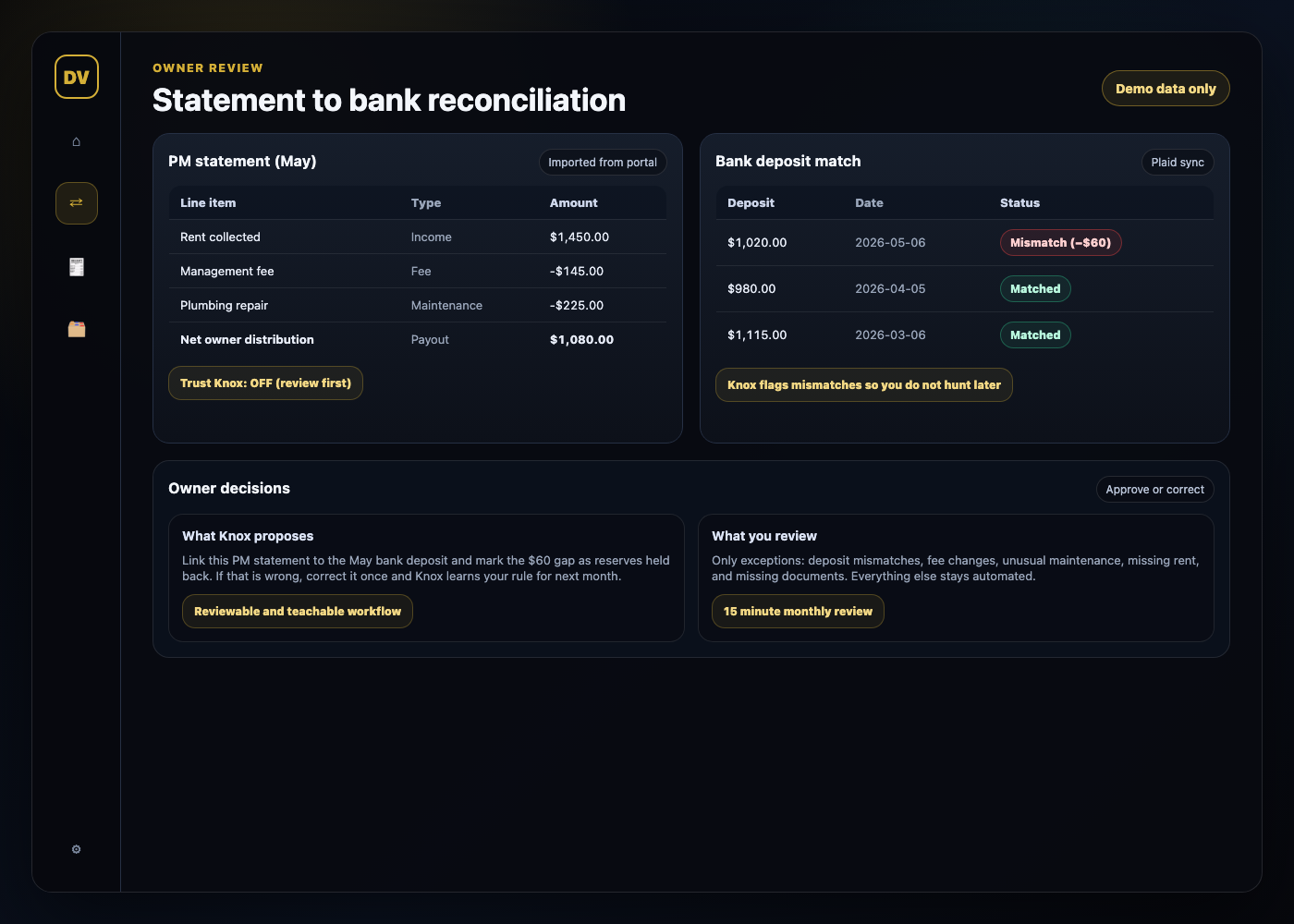
Your property manager sends a statement showing:
- Rent collected: $1,450
- Management fee: $145
- Repair: $225 (plumbing)
- Net owner distribution: $1,080
Now you check your bank and the deposit is $1,020.
That $60 gap is where remote ownership becomes expensive. Sometimes it is a real error. Sometimes it is reserves. Sometimes it is a timing issue. The point is that it needs to be explainable.
With DoorVault, the statement gets processed line by line and the net distribution is matched against the bank feed. If the deposit does not match the statement, it is surfaced immediately so you do not discover it three months later.
Then Knox does the part that normally eats your time:
- Files the statement PDF to the property automatically
- Links any supporting invoices to the same property and the same month
- Flags anomalies like fee changes, duplicate charges, or missing rent
- Keeps a clean activity log so you can see what changed and revert a single field if needed
Instead of reading every line item first, your monthly routine becomes reviewing the handful of exceptions that need owner judgment.
The scaling problem: multiple property managers, multiple portals
Remote ownership often turns into multi market ownership.
One property in Florida. Two in Alabama. A Section 8 deal in Birmingham. A refinance in another state. A new property manager in a new market.
This is where most systems break.
Every property manager has their own portal, their own statement format, and their own categories. Even if each property is doing fine, the owner side view is fragmented.
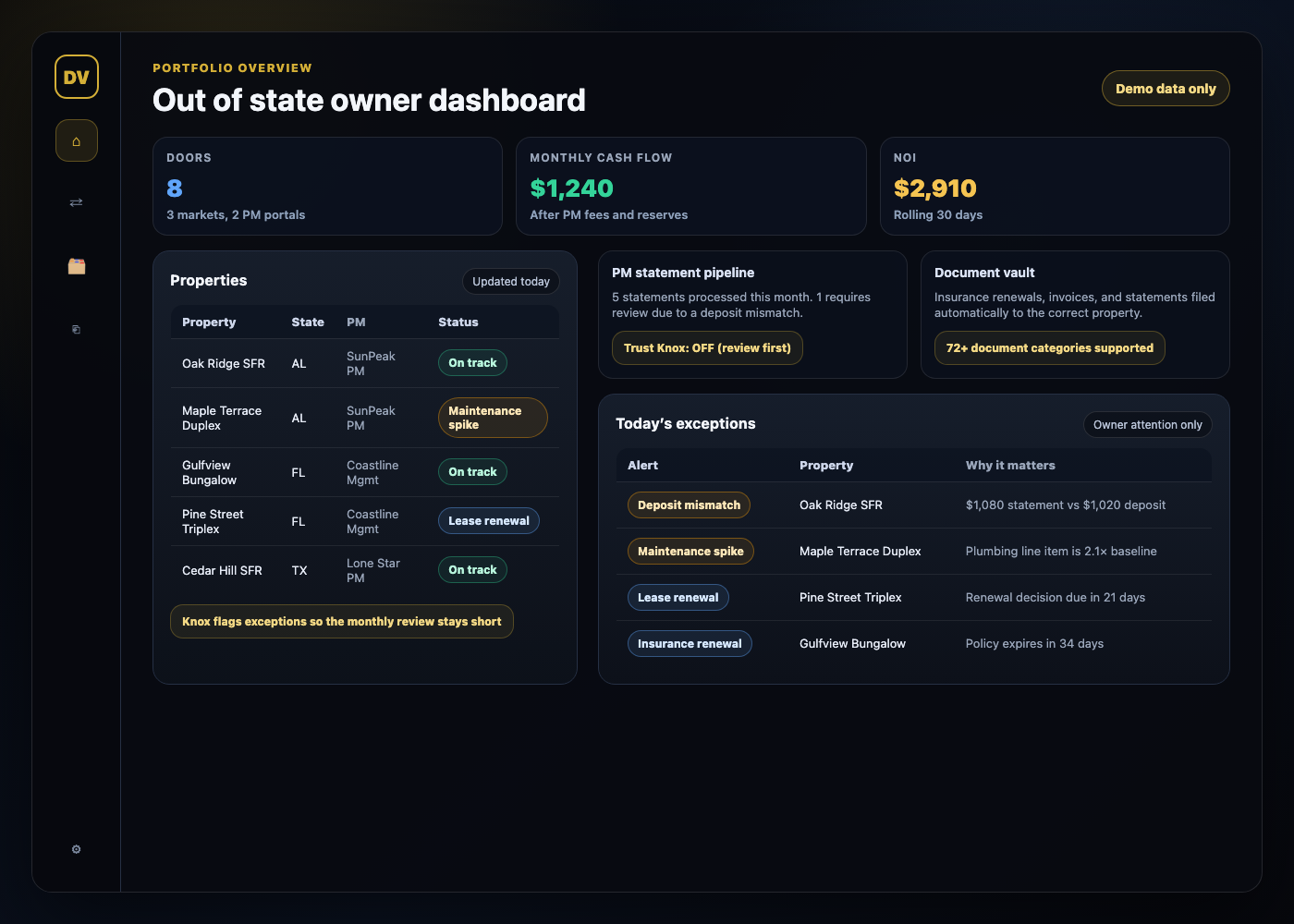
DoorVault Connect is the Chrome extension that lets you sync data from common property manager portals into DoorVault so you can operate from one dashboard.
Your property managers do not need to change software. You keep control of your owner view, your statement history, and your performance tracking even if a PM changes tools or you change PMs.
This is what makes remote ownership scalable. One routine, one source of truth, one place where the documents and the numbers live together.
The payoff: one system across finances, documents, loans, and compliance
Vetting the PM and having local vendors matters. The leverage comes from the owner side system that runs every week you are not thinking about your rentals.
DoorVault is built to cover the full owner workload, not just one feature:
- Document vault with automated filing across 72 plus document categories
- PM statement processing and anomaly detection
- Bank reconciliation and transaction categorization
- Portfolio dashboard, per property P and L, and reports hub
- Loans dashboard with mortgage splitting and amortization tracking
- Equity and LTV monitoring
- Multi entity reporting and one click tax exports
- Section 8 voucher, inspection, and payment tracking when you need it
- Collaboration portals so your CPA and partners do not need emailed spreadsheets
That breadth is the difference between a tool you log into sometimes and a system that keeps your portfolio current automatically.
The simplest way to start
If you want remote ownership to feel passive, start with one rule.
Every property document goes into one pipeline.
Forward it, upload it, or sync it. Let the system read it, file it, and keep the numbers current. Then spend your time on decisions, not data entry.
Explore DoorVault at https://doorvault.app.