
Capital Improvements vs Repairs (Rental Property): The Landlord Cheat Sheet for Tax Time
If you have a property manager, you have probably seen this movie.
A vendor invoice hits your inbox. The description is vague. The amount is not small. And you immediately wonder, is this a repair I deduct now, or a capital improvement I have to depreciate over time?
That decision is not tax trivia. It is one of the fastest ways to either leave deductions on the table or create a messy paper trail that comes back to bite you.
This guide gives you two things:
- A practical cheat sheet for common rental expenses
- A simple tracking system that still works after you have 5+ doors and a PM feeding you documents
The mistake that costs landlords the most: gray area work
The obvious stuff is easy.
A clogged drain. A broken doorknob. A leaking trap under a sink. Those are usually repairs.
The problems show up in the gray area. The work that is “kind of” an upgrade and “kind of” maintenance. The invoices that mix multiple scopes. The turnover bundles that include paint, patch, flooring, and appliances on one bill.
Here is a realistic example.
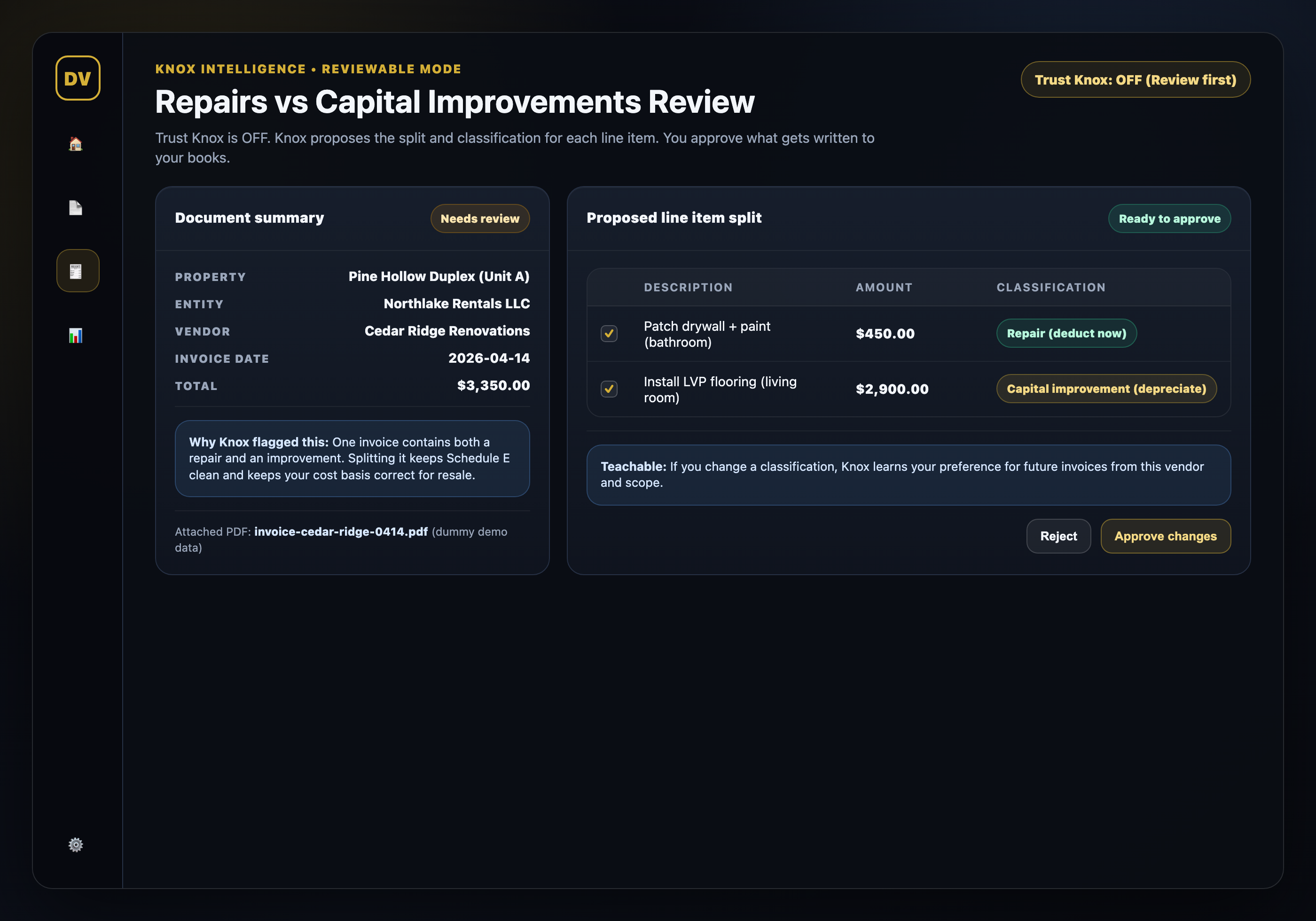
Your PM forwards a $3,350 invoice with two line items:
- Patch drywall + paint (bathroom): $450
- Install LVP flooring (living room): $2,900
If you dump the full $3,350 into repairs, you are probably misclassifying a big portion of the spend. If you treat the whole thing as a capital improvement, you are probably delaying a legitimate deduction.
This is why the best landlords do not just “categorize transactions.” They split them and keep the documents tied to the decision.
Capital improvement vs repair in plain English
You do not need to memorize a tax code section to make better decisions.
Use this plain-English lens:
- A repair generally keeps the property in working order. You are restoring something to where it already was.
- A capital improvement generally makes the property better than it was, extends useful life, or adapts it to a new use.
If you like quick questions, start here:
- Did this work add value beyond restoring function?
- Did it extend useful life in a meaningful way?
- Did it change the property’s use or materially upgrade a major system?
If the answer is yes to any of those, you are often in capital improvement territory.
Two important operator notes:
- Many invoices include both repair and improvement work. Splitting is normal.
- The same category can flip depending on scope. “Painting” could be a quick patch (repair) or part of a larger remodel (improvement).
If you are unsure, ask your CPA. But do not wait until March to find the invoices. The tracking system matters more than the debate.
The landlord cheat sheet: common expenses and how they are usually treated
This section is not tax advice. It is the practical pattern most landlords run into. Your CPA should make the final call for your situation.
Here is the cheat sheet landlords ask for most:
- Leaky faucet, small plumbing fix, clogged drain: usually a repair
- Patch drywall, touch-up paint after a tenant move-out: usually a repair
- Full interior repaint as part of a renovation plan: often a capital improvement
- Replace a few broken shingles: usually a repair
- Replace an entire roof: often a capital improvement
- Replace a few boards on a deck: usually a repair
- Rebuild a deck or add a new deck: often a capital improvement
- Replace a single window pane: usually a repair
- Replace all windows with a new spec: often a capital improvement
- Fix an HVAC issue, replace a small part: usually a repair
- Replace the entire HVAC system: often a capital improvement
- Kitchen refresh (cabinets, counters, layout upgrades): often a capital improvement
- New flooring in one room: often a gray area, but commonly treated as a capital improvement if it is an upgrade
The pattern is simple. Small, localized fixes trend repair. Whole-system replacements trend improvement.
And this is where portfolios get messy fast. If your PM sends you a statement with “Turnover: $6,200,” you cannot classify that correctly without the underlying invoice detail.
How to handle mixed invoices (the split rule that keeps you sane)
Mixed invoices are the most common failure mode for PM-managed owners.
The PM sends one vendor bill. The bill includes a repair plus an upgrade. If you force it into one bucket, you create a future headache for yourself and your CPA.
Use this split rule:
- Break the invoice into line items (or reasonable sub-amounts if the vendor did not itemize well).
- Tag each line item as repair or capital improvement.
- Save the source document and the “why” note for anything you expect to be questioned.
Even a simple note like “flooring upgrade placed in service after tenant move-out” is better than nothing.
This is where Knox Intelligence matters in the real world.
Knox Intelligence is AI that proposes, learns, and never touches your data without permission. If you want control, you flip Trust Knox OFF. Knox proposes the split and classification, you approve what gets written. If you want speed, you flip it ON and Knox applies changes automatically.
Either way, you are not rebuilding your books from scratch at tax time.
If you want to see what that looks like on real workflow, start free and run a few invoices through the review screen. Two properties, no credit card. https://doorvault.app
The tracking system: what to save so you stay audit-ready
If you use a property manager, you are not short on documents. You are short on organization and linkage.
A tracking system that works looks like this:
- Every invoice and statement is stored under the correct property
- Every transaction ties back to its source document
- Every capital improvement has a placed-in-service date and notes
- You can export a clean summary for your CPA without emailing spreadsheets back and forth
This is also where most landlord tools fail. They can show a report template, but they cannot populate it unless you do manual entry.
DoorVault is built for the owner side of PM-managed rentals. Forward any property-related email, upload files, or sync a folder. Knox reads the documents, extracts the data, files everything to the right property and entity, and proposes the bookkeeping updates for review.
That means your tracking system becomes automatic:
- The Document Vault stays organized without you renaming files
- Transactions are created from invoices and PM statements
- Capital improvement vs repair tagging stays consistent via teach-once corrections
- The Activity Log gives you a before-and-after audit trail with one-click revert
If you want a deeper document workflow, this guide pairs well: https://blog.doorvault.app/best-way-to-organize-rental-property-documents-system
If you want a simple map of what ultimately rolls up into your rental tax return, start here: https://blog.doorvault.app/blog/how-to-fill-out-schedule-e-for-rental-properties-a-line-by-line-2026-guide
How DoorVault keeps repairs vs improvements clean across your whole portfolio
Repairs vs improvements is not a one-time decision. It is a recurring operational loop.
If you want it to stay clean, you need more than a category dropdown. You need a system that can:
- Process PM statements line-by-line, not as one lump number
- Flag weird spikes and duplicate charges so you catch mistakes early
- Keep loan and entity context attached to the property so reports make sense
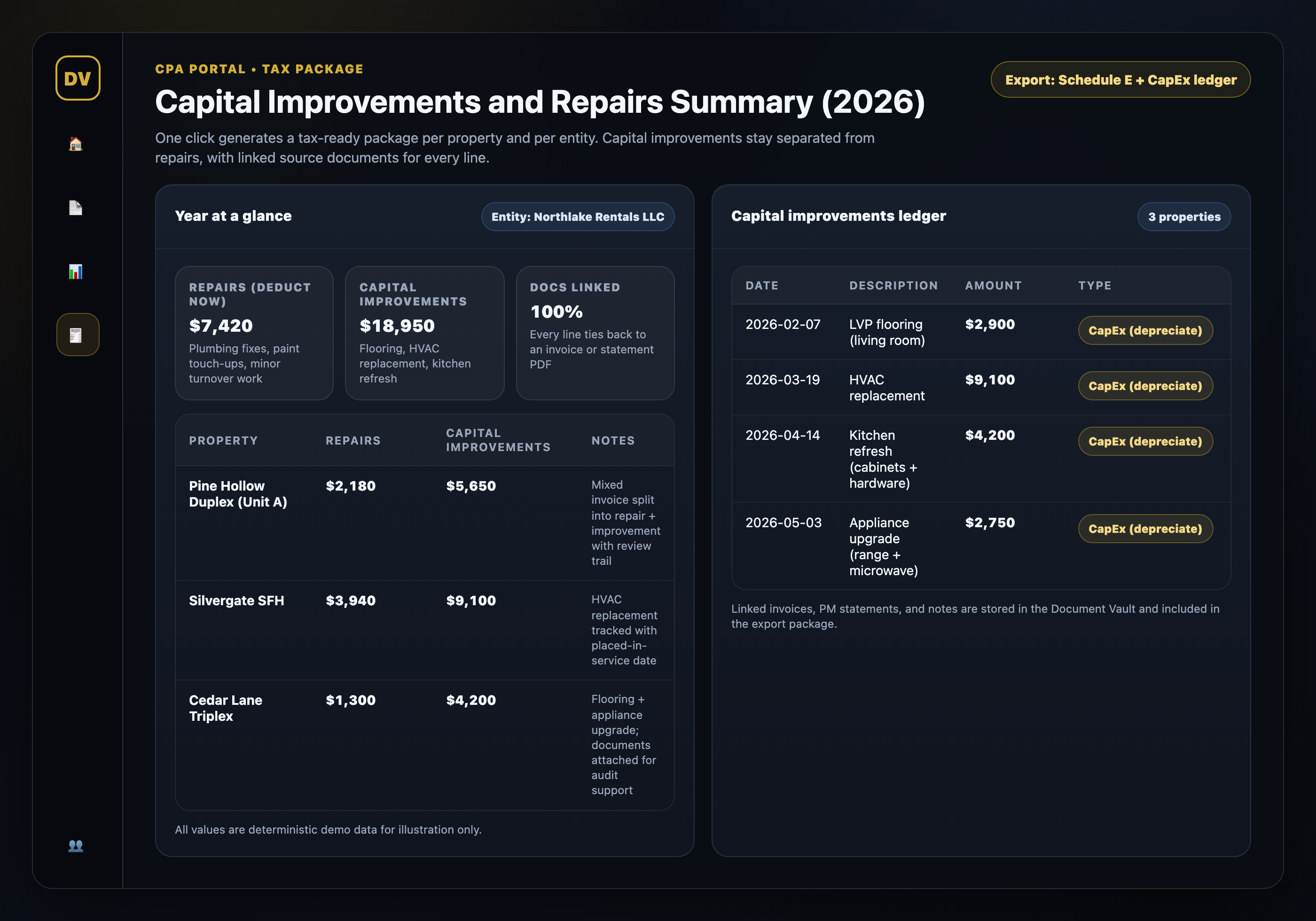
- Produce tax exports and a CPA-ready package on demand
DoorVault is designed around that reality.
You can onboard a new property with purchase details, loans, and entities. Then you feed Knox the messy inputs you already receive: PM statements, invoices, tax bills, insurance renewals, closing docs, inspections, lease agreements. Knox turns that mess into structured data and keeps your portfolio dashboard accurate in real time.
And when tax season hits, you are not digging. You export.
If you also care about depreciation strategy and tracking over multiple years, read this next: https://blog.doorvault.app/cost-segregation-rental-property-tracking
CTA: make your books tax-ready without spreadsheets
If you are tired of guessing whether something is a repair or an improvement, the fix is not “a better spreadsheet.” It is a better system.
DoorVault runs the entire investor side of rental ownership on autopilot. It processes your documents, keeps your transactions clean, tracks capital improvements, and exports tax-ready data per property and per entity.
Start free with two properties (no credit card) at https://doorvault.app.