
Rental Portfolio With Multiple Property Managers: One Dashboard for Every PM
When a rental portfolio has multiple property managers, the hardest part is not owning in different states. It is getting one clean answer to a basic question.
How is the whole portfolio doing right now?
One PM sends a statement from RentManager. Another uses Buildium. Another uses AppFolio. The owner portal looks different in every market. The timing is different. The categories are different. The PDFs are different. So your rental portfolio multiple property managers problem turns into three logins, three reports, three spreadsheets, and one very tired owner trying to make the numbers agree.
That is not passive income. That is data janitor work.
Why the multi PM problem gets worse at 10 doors
A spreadsheet can survive one PM and three doors.
It starts to break when the portfolio looks more like a real operator portfolio.
Picture 10 doors across 3 states: 4 rental properties in Florida, 4 Section 8 properties in Birmingham, 1 in South Carolina, and 1 more in Alabama outside Birmingham.
That setup is normal for an investor who is scaling. You buy where the numbers work. You hire local property managers. You let each PM run the day to day.
The problem is that every PM becomes its own data universe.
One PM reports repairs as maintenance. Another splits make ready costs into labor, materials, and admin. One statement shows reserve movements clearly. Another buries the reserve change inside the owner draw. One portal gives you maintenance status. Another only gives you a PDF at month end.
Now try answering these questions quickly:
- Which PM is charging the most in maintenance as a percent of rent?
- Which property has the best real cash flow after reserves?
- Which Section 8 payments are clean and which need follow up?
- Which expenses need to move to capital improvements before tax time?
- Which PM statement actually matches the bank deposit?
If the answer requires three portals and a Saturday morning, the system is the problem.
DoorVault Connect pulls every PM into one owner view
DoorVault Connect is the Chrome extension that lets owners sync data from RentManager, Buildium, and AppFolio into DoorVault.
You sign in to your PM owner portal the way you already do. Then you open DoorVault, choose the date window you want, and run the sync.
Knox Intelligence is the AI layer that proposes, learns, and never touches your data without permission. Once the PM data lands in DoorVault, Knox helps normalize the messy owner side reality into one portfolio view.
Income, expenses, owner statements, leases, tenants, vacancies, reserve movements, maintenance items, and supporting documents all land where they belong.
The point is simple.
Your PMs can keep using the systems they already use. You do not need to convince them to change software. You do not need to wait for them to export a custom report. You do not need to rebuild your own dashboard every month.
DoorVault becomes your owner side source of truth.
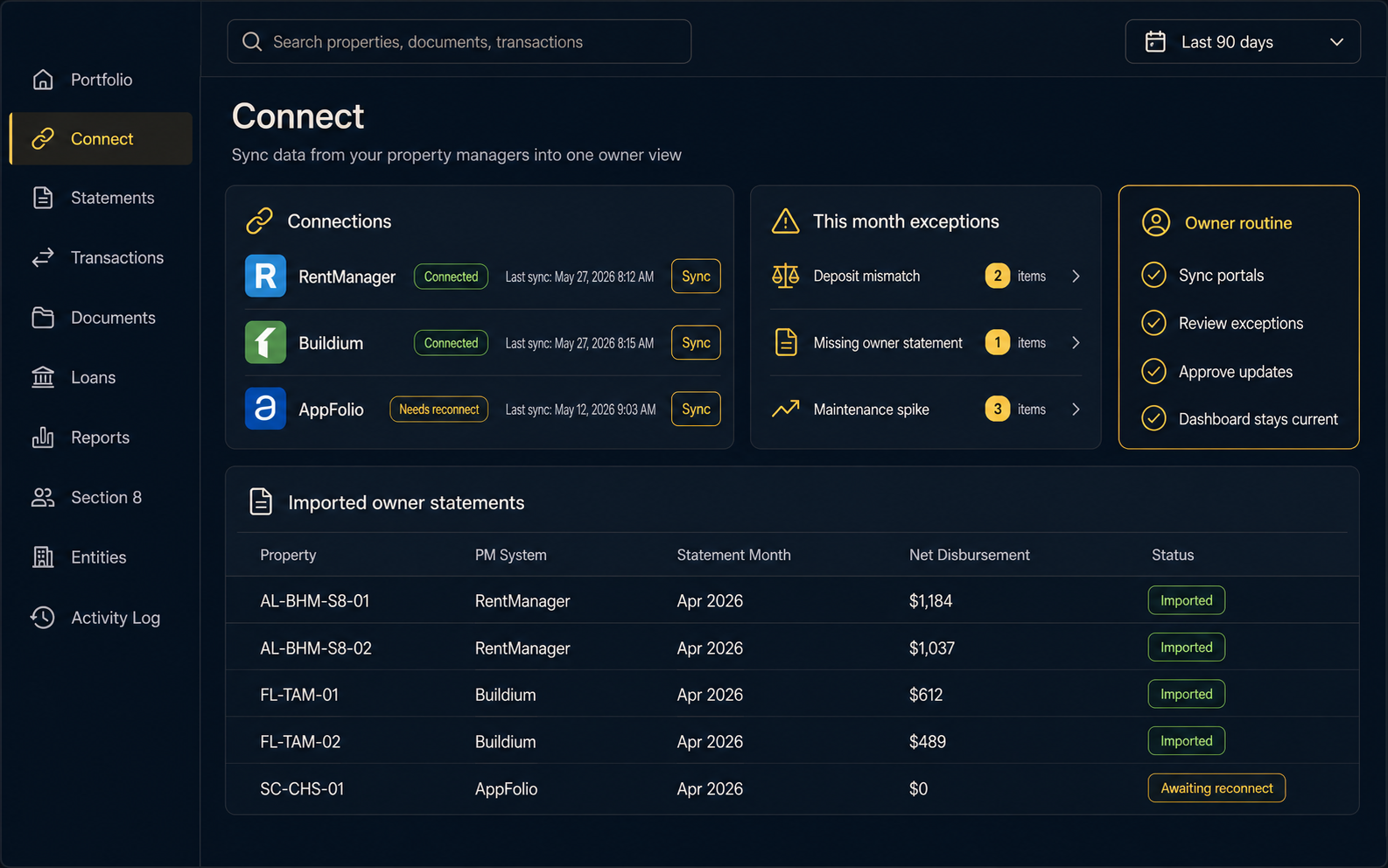
The sync is owner controlled
DoorVault Connect was built around a basic trust rule: the owner stays in control.
You sign in to the owner portal yourself. DoorVault never sees or stores your PM username or password.
The extension stays quiet until you ask DoorVault to sync. It does not read unrelated tabs. It does not scrape in the background. It does not keep your owner portal session alive after it expires.
Inside DoorVault, you choose the import window. This month. 3 months. 6 months. 12 months. Year to date. All data.
If your PM session expires, DoorVault shows that the connection needs a reconnect. That is the honest version. No invisible keepalive tricks. No mystery access.
If you sync the same period twice, DoorVault updates or links existing records instead of creating duplicate cleanup work. That matters because owners will rerun a month. You will want to refresh after a PM closes the books or posts a corrected owner statement.
The workflow should forgive normal owner behavior.
Reconciliation happens when the statement meets the bank feed
The most expensive part of multi PM ownership is not logging in. It is making the cash agree.
Your bank shows a deposit. Your PM statement explains that deposit. Your spreadsheet tries to connect them.
DoorVault does that matching for you.
As each PM statement imports, DoorVault compares it against bank transactions and matches the owner distribution to the statement that explains it. Estimated splits get corrected to the actual statement values. The deposit and the statement reconcile when they meet.
That changes the monthly owner routine.
Instead of reading every line item first, you review exceptions:
- A deposit that does not match the PM statement
- A maintenance spike outside the normal range
- A duplicate fee
- A missing rent payment
- A reserve movement that needs a document
This is where Knox gets useful. Knox reads 72 plus document types, files statements and invoices to the right property, flags anomalies, and keeps the Activity Log so you can see what changed.
You are not trusting a spreadsheet formula anymore. You are reviewing the few things that actually need owner judgment.
What one dashboard gives you that three portals never will
Owner portals inside PM software are built around the PM.
DoorVault is built around the owner.
That difference shows up in the dashboard.
With DoorVault, every property sits in one portfolio view regardless of which PM manages it. You can see real time NOI, cash flow, occupancy, equity, debt, property health, and per property performance in the same place.
The PM Report Card gives you a structured comparison across managers. Fees, maintenance costs, vacancy patterns, missing statements, and performance trends become visible side by side.
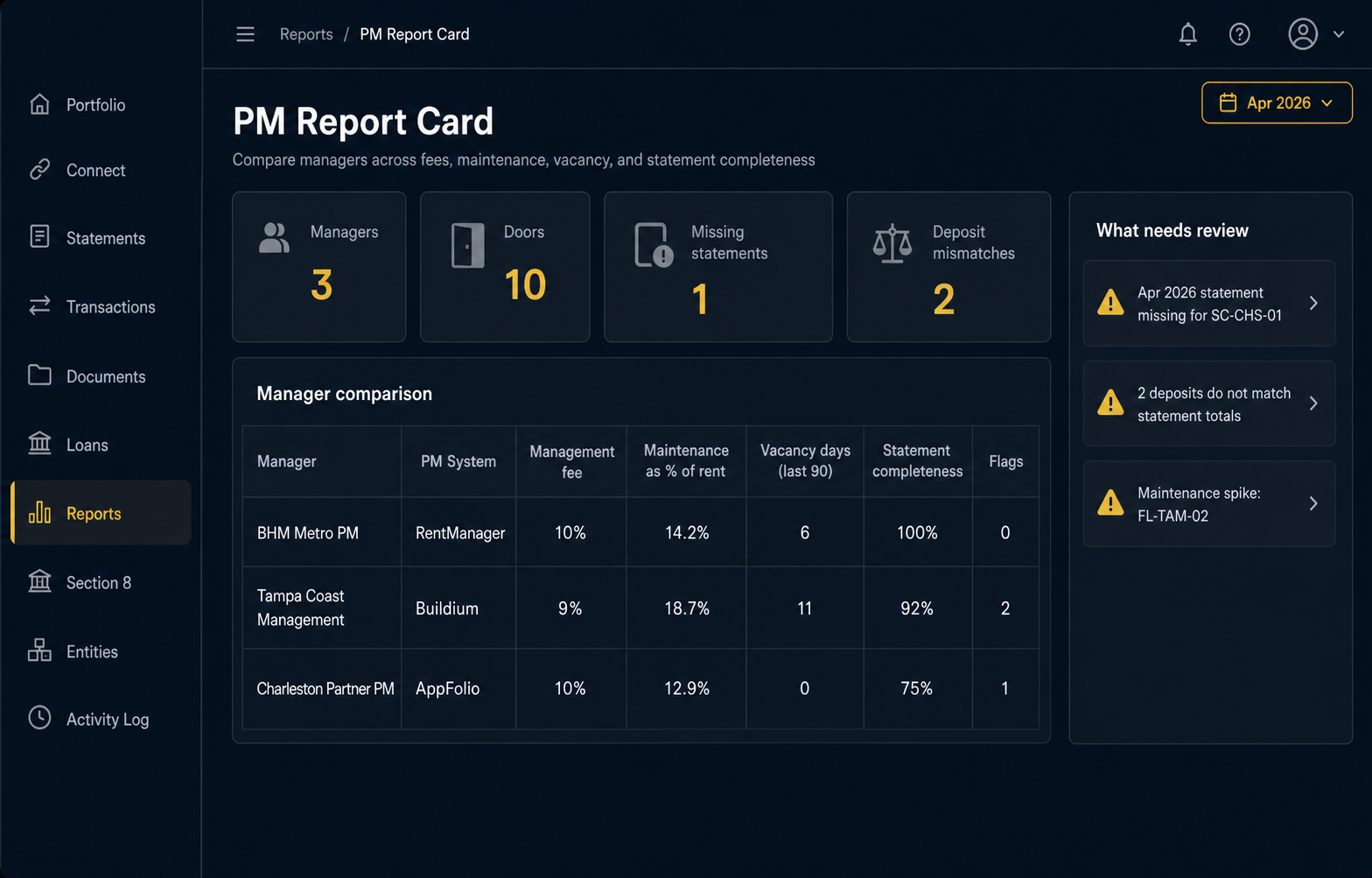
The Reports Hub gives you portfolio profit and loss, per property profit and loss, PM comparison, and entity financials. Schedule E export covers every property in one clean tax package. Loans Dashboard keeps debt, PITI, loan terms, LTV, and paydown visible. Section 8 tracking keeps HAP payments, tenant portions, inspections, vouchers, and compliance dates organized.
That breadth matters because your portfolio does not operate in separate tabs.
A repair invoice affects cash flow. A missing statement affects reconciliation. A lease expiration affects the property health score. A mortgage escrow change affects Schedule E. A Section 8 inspection affects expected rent.
DoorVault ties those pieces together.
The new owner routine
The best owner system is boring.
Here is the routine DoorVault Connect is designed to create:
- Sync each owner portal on your preferred schedule.
- Let DoorVault import statements, transactions, leases, tenants, and documents.
- Let Knox organize the data and flag the exceptions.
- Review mismatches, odd expenses, and missing documents.
- Use one dashboard to make portfolio decisions.
That is it.
No copying data from 3 PM statements. No rebuilding a monthly spreadsheet. No waiting until tax season to discover that 4 properties were categorized one way and 6 properties another way.
If you use property managers because you want the portfolio to be passive, the owner side data layer needs to be passive too.
FAQ
Does DoorVault Connect replace my property manager software?
No. Your PM keeps using RentManager, Buildium, or AppFolio. DoorVault gives you the owner side view across every PM.
Do I have to give DoorVault my owner portal password?
No. You sign in to the owner portal yourself. DoorVault never sees or stores your PM username or password.
What happens if I sync the same month twice?
DoorVault updates or links existing records instead of creating duplicates, so you can refresh corrected months without creating cleanup work.
Can I use this with more than one PM?
Yes. That is the point. DoorVault Connect is built for owners with multiple property managers across markets and platforms.
One portfolio, not three portals
The more markets you own in, the less your old spreadsheet can tell you.
If your portfolio is spread across multiple PMs, you need one owner side dashboard that makes the data usable.
Start at https://doorvault.app and click Try Demo to see how DoorVault brings PM data, documents, bank activity, loans, taxes, compliance, and portfolio performance into one place.