Best Way to Organize Rental Property Documents: A System That Still Works After 5+ Doors
If you own a few rentals, you can usually get away with chaos. Your lease is in email. Your insurance declaration is in a Google Drive folder you swear you will clean up later. Your closing docs are somewhere on your laptop named something like “closing final FINAL.pdf”.
Then you hit the wall. Property 3 turns into property 6. Documents show up from three directions (property manager, vendors, lenders). You need a file right now, not “after I search my inbox for 20 minutes”.
This guide is the best way to organize rental property documents if you want a system you can actually keep up with.
Why rental document chaos gets expensive fast
Most landlords think disorganization is just annoying. It is not. It is a cost center.
Here are the three places it shows up first:
- Tax time: You can only deduct what you can prove. If your expense support is scattered, you will either miss deductions or burn nights rebuilding the paper trail.
- Tenant disputes: Security deposit claims and repair disputes are evidence fights. Photos, notices, work orders, and receipts are the difference between “easy win” and “I guess I will pay to make this go away.”
- Refinances and insurance renewals: Lenders and agents always ask for the same documents, and they always ask when you are busy. The scramble is the pain tax.
The deeper issue is volume. A single property can generate 30 to 50 meaningful documents per year when you include leases, addendums, PM statements, invoices, inspections, renewals, and loan paperwork. At 10 doors, that is 300 to 500 documents per year. If your system requires manual renaming and filing every time, you will eventually stop doing it.
The only system that scales: capture, classify, find, renew
Forget fancy folder trees. If you want a system that survives growth, you need four outcomes:
- Capture: every document lands in one place automatically
- Classify: every document gets tied to the right property and category
- Find: you can retrieve any document in 10 seconds
- Renew: you get nudges before expirations, not after problems
Most DIY systems only solve the last mile (folders). They fail at capture and classification, which is why people fall back to “it is in my email somewhere”.
This is also where Knox Intelligence shows up as more than storage. Knox Intelligence is AI that proposes, learns, and never touches your data without permission. You can keep full control with review first mode, or let Knox move faster when you are confident.
What to keep per property (the practical checklist)
You do not need to hoard everything. You do need to keep the documents that protect you financially and operationally.
Here is the practical checklist, by category:
Acquisition and loan
- Closing disclosure or settlement statement
- Deed, title policy, and purchase contract addendums
- Mortgage note, escrow statements, and annual mortgage interest forms
- Appraisal and inspection reports (initial and major follow ups)
Tenant and leasing
- Lease and every addendum
- Move in condition report and move out condition report
- Photo or video documentation (move in and move out)
- Notices (late notices, cure or quit, lease violations)
Property management
- Monthly PM statements (every month, even “boring” months)
- Owner distributions and reserve account statements
- Management agreement, fee schedule, and any amendments
Maintenance and capital improvements
- Work orders, invoices, and receipts
- Warranties and manuals for major systems (HVAC, roof, appliances)
- Before and after photos for major projects
Insurance and compliance
- Current policy declarations and renewals
- Claims correspondence if anything happens
- Licenses, permits, and required inspections for your market
- If you do Section 8: voucher and inspection paperwork, HAP details, and repair reinspection notes
If you already have a property manager, this list is exactly why you still need an owner side system. Your PM might have some of these. You still need to be able to pull them instantly without asking.
Naming and folders: the minimum viable setup
If you are staying DIY for now, keep it simple.
Use a two level structure:
- Top folder per property (use a short nickname, not the full address)
- Inside that, five folders: Acquisition, Tenant, PM, Maintenance, Insurance
Then use one naming rule that is hard to mess up:
YYYY-MM-DD Category Short description
Example: 2026-05-01 PM Statement April or 2026-03-12 Insurance Renewal Declaration.
This works, but it still depends on you doing it every time. If you skip a month, the system starts lying to you.
The better approach: let documents update your portfolio automatically
DoorVault is built for the owner side of rentals, especially when you use a property manager. The goal is not “a prettier folder”. The goal is that your portfolio runs itself.
Here is what the workflow looks like when you use Knox:
- Capture: forward any property related email to your Knox inbox, upload a file, or sync a cloud folder.
- Classify: Knox recognizes the document type, ties it to the right property, and files it into your Document Vault automatically.
- Extract and update: Knox pulls out the useful fields and proposes the changes for review, or applies them automatically if you have Trust Knox enabled.
That is where the real payoff comes from. Documents stop being dead weight. They become structured data that keeps everything else current:
- PM statements turn into categorized transactions and PM oversight signals
- Loan statements update your loans dashboard and debt picture
- Insurance renewals update expiration tracking and coverage history
- Vendor invoices become expenses that flow into your per property P&L and reports hub
And because Knox logs actions in the Activity Log with before and after snapshots, you get an audit trail instead of mystery changes.
If you want a deeper walkthrough of how Knox handles real world files, read: https://blog.doorvault.app/how-doorvault-reads-any-document-you-throw-at-it-settlement-statements-pm-reports-insurance-leases-and-68-more
If you are specifically trying to get out of monthly statement chaos, this pairs well with: https://blog.doorvault.app/owner-statement-reconciliation-how-to-match-your-pm-statement-to-your-bank-deposit-every-month
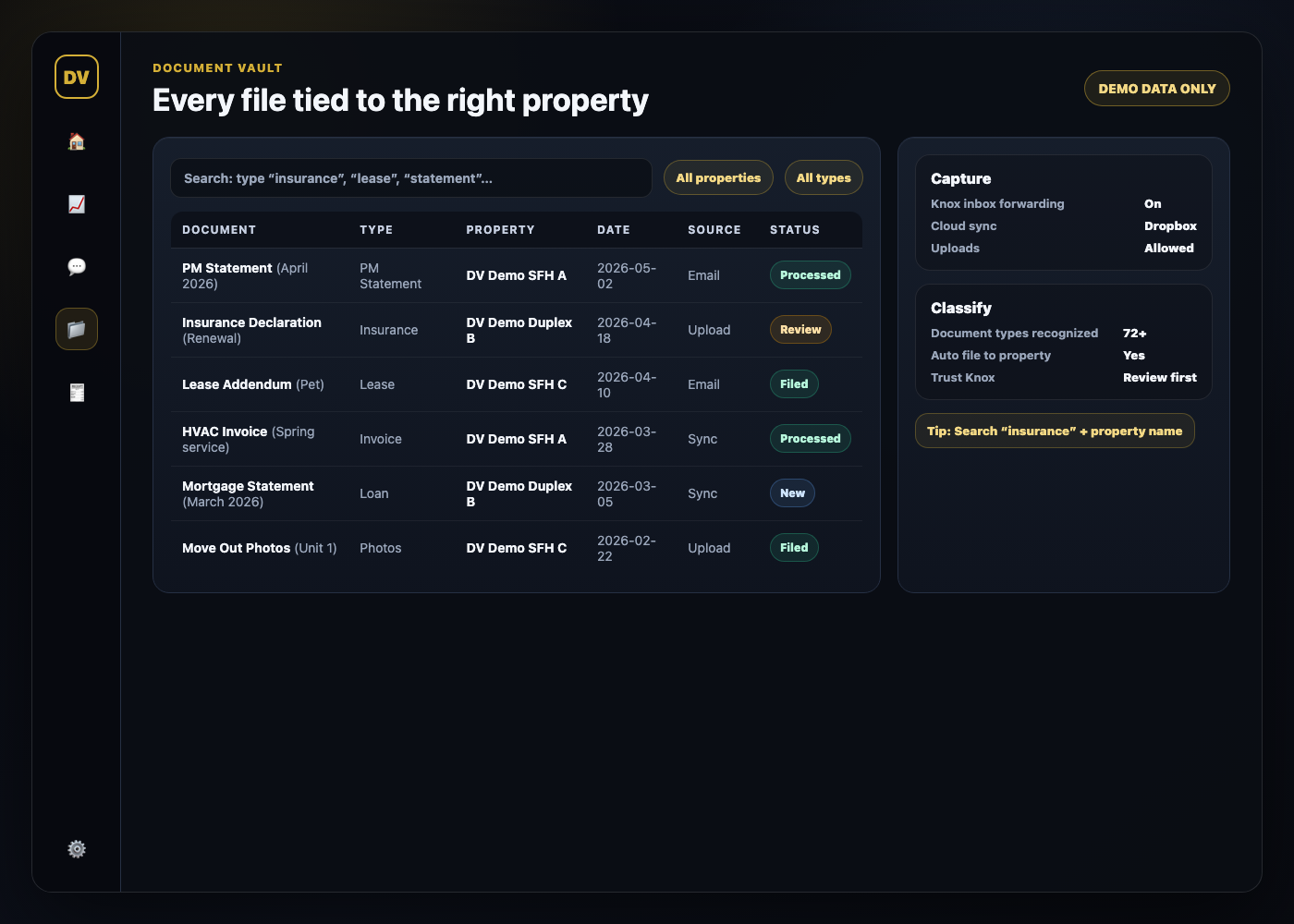
Inline example: what a clean document vault looks like
Below is a mockup of what “organized” looks like in practice: documents tied to the right property, tagged by type, and searchable.
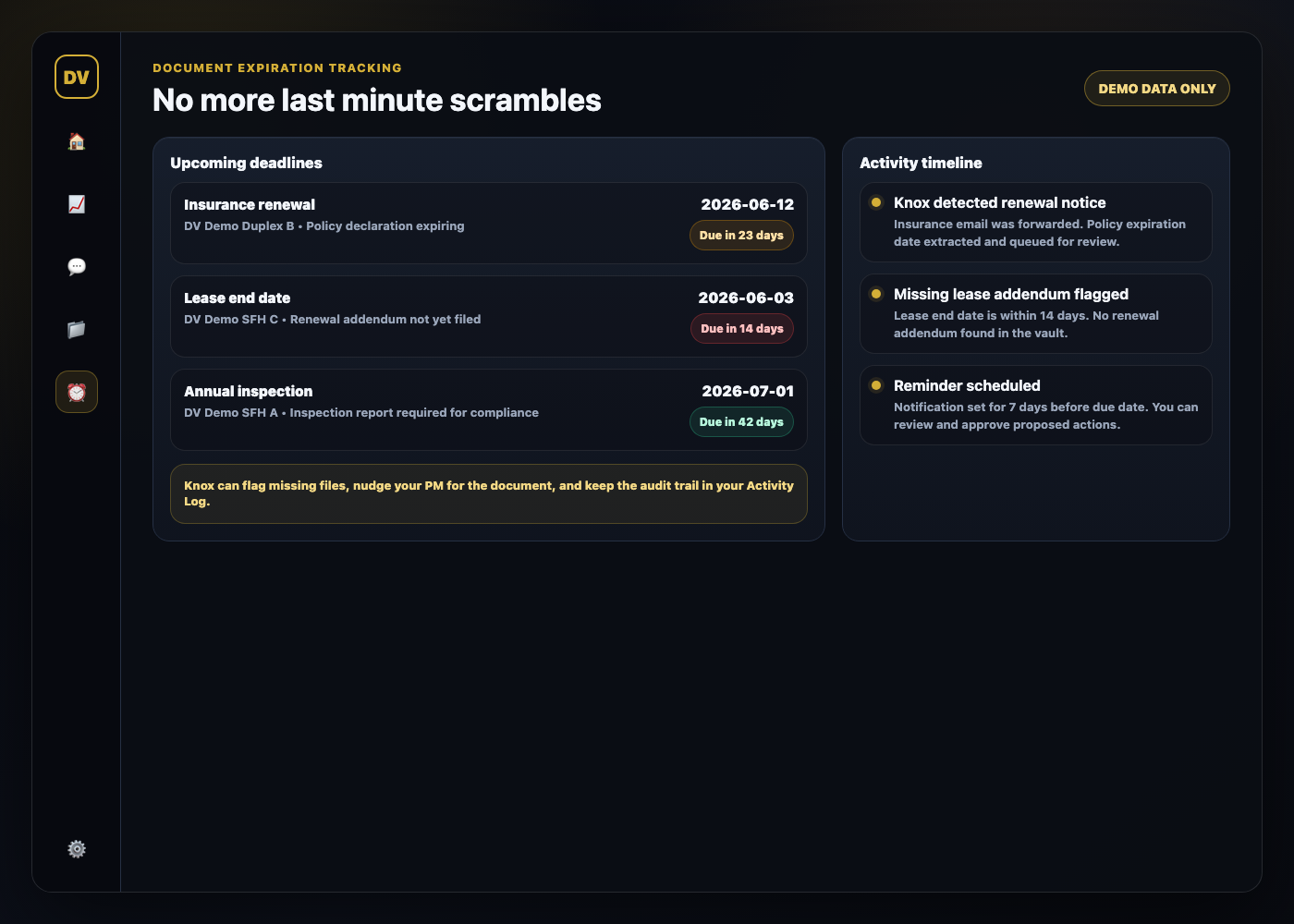
Inline example: expiration tracking that prevents last minute scrambles
This is the part most folder systems never solve. Expiring documents do not announce themselves. A good system does.
If you want passive income, your documents cannot live in your inbox
If you are honest, the issue is not that you do not know where to put the files. The issue is that the files keep coming, and you do not want another monthly admin job.
The “best way” is the system you will actually maintain:
- One capture point
- Automatic classification
- Instant retrieval
- Expiration reminders
If your current process relies on willpower, it will break as you scale.
FAQ
How long should I keep rental property documents?
Keep anything that supports income, deductions, and disputes for multiple years, and keep acquisition and major improvement records long term. If you are unsure, keep it. Storage is cheap. Scrambling is expensive.
Should my property manager keep these documents for me?
Your PM should keep their records. You still need an owner side system so you can pull documents without waiting and so your portfolio data stays consistent across PM changes.
Do I need separate folders for every tenant?
Yes for tenant facing documents and condition reports. But if it becomes a time sink, that is a signal you need a system that can classify and file automatically.
What is the fastest way to find a document during a lender request?
Search by property plus document type plus date range. If your system cannot do that, you will default to email search, and email search always fails when you are under pressure.
Ready to stop organizing and start running your portfolio?
Try DoorVault free for up to 2 properties. Forward documents, upload files, or sync a folder and let Knox do the work. Start at https://doorvault.app and click Try Demo.