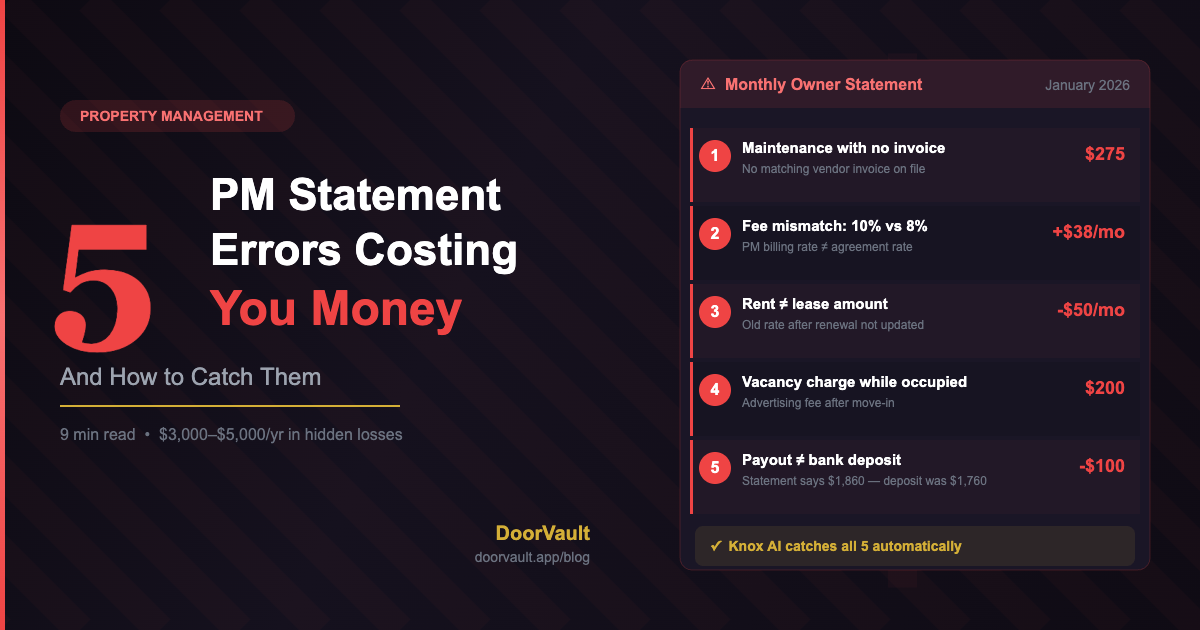
Your property manager sends you a statement every month. It shows rent collected, fees deducted, expenses charged, and your net payout. Most landlords glance at the bottom number and move on.
That habit is costing you money.
After managing 10 rental properties across multiple PMs, I’ve found errors in roughly one out of every four statements. Not fraud — just mistakes. A maintenance charge applied to the wrong property. A fee that doesn’t match the management agreement. A rent amount that’s $50 less than the lease says.
These aren’t dramatic problems. They’re $50 here, $100 there. But across a portfolio and over a year, they add up to real money — money you’re losing because nobody’s checking the math.
Here are the five most common PM statement errors I’ve caught, how they happen, and exactly what to look for when you review your own statements.
1. Maintenance Charges Without Matching Invoices
This is the most common error I see. Your PM statement shows a $350 plumbing repair, but when you ask for the invoice, it either doesn’t exist, doesn’t match the amount, or was for a different property.
How it happens: Property managers handle dozens or hundreds of units. When a vendor submits an invoice, it gets logged against a property. Sometimes the wrong property. Sometimes a vendor bills $300 but the PM passes through $350 because they included their own markup without disclosing it in your management agreement.
What to check: For every maintenance charge over $100, request the vendor invoice. Compare three things: the property address on the invoice, the dollar amount, and the date of service. If any of those don’t match the PM statement, you have a question to ask.
Real example: I had a $275 “electrical repair” show up on my January statement for a Birmingham property. When I asked for the invoice, the vendor invoice was actually for $195. The PM had added an undisclosed coordination fee. That’s $80 I would have never recovered if I hadn’t checked.
2. Management Fee Percentage Doesn’t Match Your Agreement
Your PM agreement says 8% of collected rent. Rent is $1,925. The management fee should be $154. But the statement shows $192.50.
How it happens: This usually isn’t intentional. Many PMs calculate fees based on gross rent rather than collected rent, or they round up, or their billing system has a different percentage stored than what’s in your agreement. If you have a tiered fee structure (8% for the first 5 units, 7% after that), the error rate goes up significantly.
What to check: Pull out your PM agreement. Find the exact fee percentage and what it’s calculated against (gross rent, collected rent, or net rent). Then do the math on every statement. If you have 10 properties, that’s 10 multiplication problems per month — 120 per year. Tedious, but important.
The math that matters: On a $1,925 rent, the difference between 8% and 10% is $38.50 per month. Across a year, that’s $462. Across 10 properties, that’s $4,620 in overcharges — all from a “rounding” error in the PM’s billing system.
3. Rent Amount Doesn’t Match the Lease
This one seems too obvious to happen, but it does. The lease says rent is $1,100. The PM collects $1,050. Your statement shows $1,050 in collected rent. You don’t notice because you’re looking at the net payout, not the gross rent line.
How it happens: Lease renewals with rent increases are the usual culprit. The lease gets renewed at $1,100, but the PM’s system still has the old rate of $1,050. Nobody updates it because nobody cross-references the lease with the collection amount.
For Section 8 landlords, this gets even more complicated. When a tenant’s voucher amount changes, the Housing Authority Payment (HAP) portion changes, and sometimes the tenant portion changes too. If your PM doesn’t update both amounts correctly, you’re leaving money on the table.
What to check: Once a quarter, pull up each property’s current lease and compare the stated rent to what’s actually being collected on your PM statement. Pay special attention to any property that had a lease renewal in the last 6 months.
4. Vacancy Charges During Occupied Months
Your property is occupied. The tenant paid rent. But the PM statement shows a “vacancy fee” or “lease-up fee” or “advertising fee” for that same month.
How it happens: When a property becomes vacant, PMs charge various fees for advertising, showing the unit, screening tenants, and executing a new lease. These are usually legitimate. The problem is when those charges linger. The property gets leased in October, but the November statement still shows a $200 advertising charge. Or the PM charges a full month’s lease-up fee even though the property was only vacant for 9 days.
What to check: Any time you see a vacancy-related charge — advertising, listing fees, make-ready costs, lease-up fees — check it against the actual move-in date. If the tenant moved in on October 15, there shouldn’t be advertising charges in November. And that lease-up fee should be prorated, not charged as a full month.
5. Missing or Incorrect Owner Distributions
This is the sneakiest one because it doesn’t show up as a line-item error. Your PM statement says your net payout is $1,860. But when you check your bank account, the deposit is $1,760. The $100 difference just… vanishes.
How it happens: Sometimes PMs hold reserves (which may or may not be in your agreement). Sometimes they batch payments and the ACH doesn’t match 1:1 with a single statement. Sometimes there’s a processing fee that isn’t itemized on the statement. And sometimes it’s just a clerical error — the person who processes payouts typed the wrong number.
What to check: Every single month, compare the “net payout” on your PM statement with the actual bank deposit. They should match exactly. If they don’t, ask for a reconciliation of the difference immediately. Don’t let it slide for “next month’s statement.”
The Compounding Problem
Here’s what makes PM statement errors expensive: they compound.
If your PM is calculating fees on the wrong rent amount, that error repeats every month. If a maintenance charge is misallocated, it messes up your per-property P&L and your Schedule E tax filing. If vacancy charges linger, they inflate your reported expenses.
A single $100 error per property per quarter across a 10-property portfolio is $4,000 per year. And because these errors flow through to your taxes, the actual cost is even higher — you’re either overpaying in taxes or claiming deductions on the wrong property (which is an audit risk).
How to Actually Reconcile PM Statements (Without Losing Your Weekend)
Most landlords know they should check their PM statements. The problem isn’t awareness — it’s time. If you have 10 properties, reconciling every statement line-by-line takes 3–4 hours per month. That’s a full Saturday morning, every month, doing accounting instead of finding your next deal.
Here’s the minimum viable reconciliation process:
Monthly (15 minutes per property):
- Compare gross rent to lease amount
- Verify management fee calculation
- Check maintenance charges over $100 against invoices
- Match net payout to bank deposit
Quarterly (30 minutes total):
- Review all lease renewal dates vs. current rent amounts
- Check for any vacancy-related charges on occupied properties
- Compare PM fee structure to your management agreement
Annually (before tax filing):
- Reconcile total distributions received against total net payouts on statements
- Verify all maintenance expenses are allocated to the correct property
- Confirm all income and expenses map to the right Schedule E categories
How DoorVault Makes This Automatic
This reconciliation process is exactly why I built DoorVault. When you forward your PM’s monthly email to your DoorVault inbox, Knox AI reads the statement, extracts every line item, and maps it to the correct property and transaction category.
The PM Statements view in DoorVault shows you rent collected, PM fees, maintenance charges, and net payout for each property — side by side, every month. You can see at a glance if a number looks off.
Even better, Knox cross-references your PM statement amounts against your stored lease terms and management agreement percentages. If the management fee is 10% but your agreement says 8%, Knox flags it. If rent collected doesn’t match the lease, you’ll see a discrepancy alert.
The transactions ledger tracks every dollar across your entire portfolio — categorized by type, property, and category. Each one maps to the correct Schedule E line item, so errors caught at the PM statement level don’t cascade into your tax filing.
You can reconcile 10 properties in 5 minutes instead of 5 hours. Not because you’re skipping steps, but because Knox already did the extraction and comparison for you.
The Bottom Line
Your property manager isn’t trying to steal from you. But they’re managing hundreds of units, and mistakes happen. The question isn’t whether your PM statements have errors — it’s whether you’re catching them.
At $100–$400 per error, and errors showing up in roughly 25% of statements, a 10-property landlord is likely losing $3,000–$5,000 per year to unchecked PM statements. That’s money that should be in your pocket or reinvested into your next deal.
Start reconciling. Or better yet, let Knox do it for you.
Still reconciling PM statements in Excel? There’s a better way. Try DoorVault free →